Join us at FabCon Atlanta from March 16 - 20, 2026, for the ultimate Fabric, Power BI, AI and SQL community-led event. Save $200 with code FABCOMM.
Register now!Get Fabric certified for FREE! Don't miss your chance! Learn more
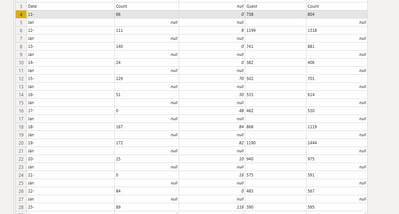
The date column is split in two rows. Any suggiestions how can I combnine the date number from the first row with the month name from the second row?
Solved! Go to Solution.
Hi,
1. split column after first character from right to identify where you have "-" and where not
2. add an if column, where is "-", column that you have now , where not null
3. on that column filled down to fill null values
4. add column - column you have now&column resulted at step 3
5. delete rows unuseful on initial column like Jan, Feb etc
Best,
Cosmin
Hi,
1. split column after first character from right to identify where you have "-" and where not
2. add an if column, where is "-", column that you have now , where not null
3. on that column filled down to fill null values
4. add column - column you have now&column resulted at step 3
5. delete rows unuseful on initial column like Jan, Feb etc
Best,
Cosmin
Worked like a charm thank you!!
@Petrosfl You could probably create two separate data sources from that - one with "Count" not null and one with "Count" null, index those columns in each data source and then merge.
Share feedback directly with Fabric product managers, participate in targeted research studies and influence the Fabric roadmap.
Check out the February 2026 Power BI update to learn about new features.
| User | Count |
|---|---|
| 70 | |
| 60 | |
| 47 | |
| 20 | |
| 16 |
| User | Count |
|---|---|
| 109 | |
| 108 | |
| 39 | |
| 27 | |
| 27 |