cancel
Showing results for 
Search instead for 
Did you mean: 

Learn from the best! Meet the four finalists headed to the FINALS of the Power BI Dataviz World Championships! Register now

Reply
pedroccamara
Helper II
Helper II

Date function

Hi guys

I'm trying to add a column with a date. I have two columns, two fields, year and month, both numeric values.

The idea is something like this... =DATE((YEAR)Anod, (Month)Mesd) and of course it's not working.

I have two questions:

1. How can i learn the formulas wich are available and how to aply them (youtube videos for example)

2. How do i make this function to work

Many thanks for your reply

Best regards

Pedro

2 ACCEPTED SOLUTIONS
Anonymous
Not applicable

@pedroccamara Are you attempting to do this in the query editor? If so, don't. The above solution is DAX, and you can implement by just right clicking on the table you want to apply the new column to and click on "New colomn" - this is where you would input the DAX syntax.

Using the query editor allows you to use "M" code to create columns etc. 2 different languages.

View solution in original post

v-haibl-msft
Microsoft Employee
Microsoft Employee

@pedroccamara


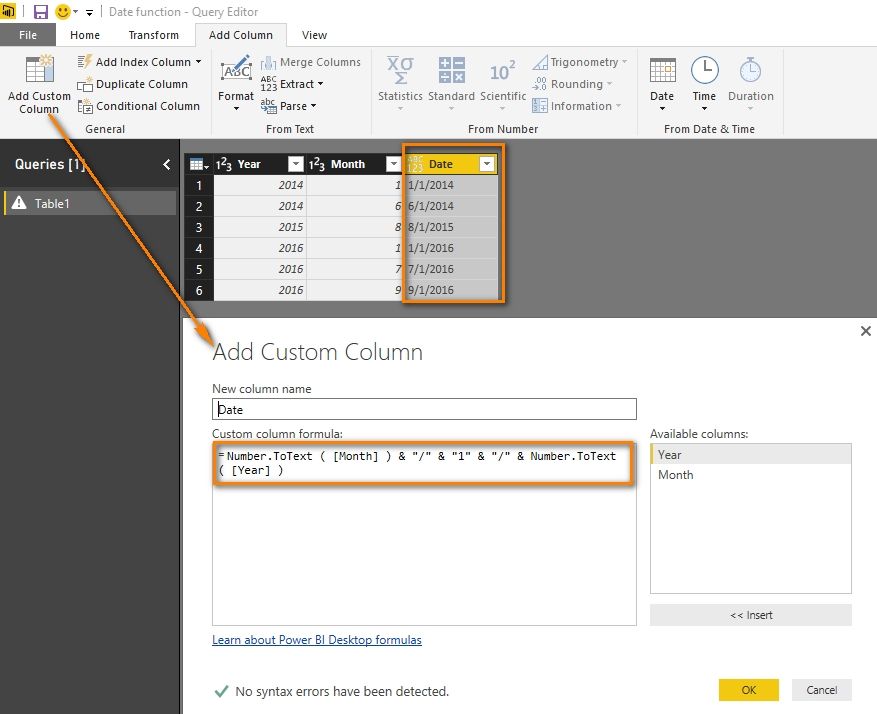
If you want to add the date column in Query Editor, you can add a custom column with following formula.

Number.ToText ( [Month] ) & "/" & "1" & "/" & Number.ToText ( [Year] )

Date function_1.jpg


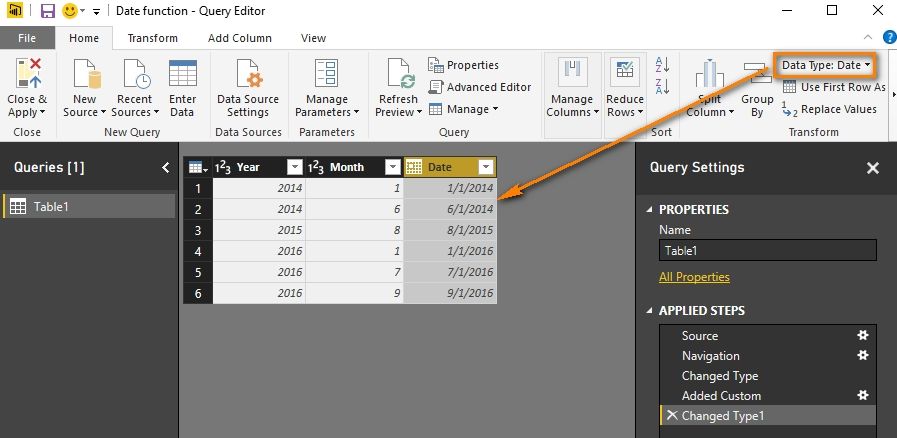
Then change the type of this column to “Date”.

Date function_2.jpg


If you want to use DAX, please following the solution provided by Eno1978.


Best Regards,

Herbert

View solution in original post

5 REPLIES 5
v-haibl-msft
Microsoft Employee
Microsoft Employee

@pedroccamara


If you want to add the date column in Query Editor, you can add a custom column with following formula.

Number.ToText ( [Month] ) & "/" & "1" & "/" & Number.ToText ( [Year] )

Date function_1.jpg


Then change the type of this column to “Date”.

Date function_2.jpg


If you want to use DAX, please following the solution provided by Eno1978.


Best Regards,

Herbert

Anonymous
Not applicable

@pedroccamara Looks like something like this would work.

Date = FORMAT(([Month] & "/01/" & [Year]), "mm-dd'yyyy")

Then just change the Data Type to Date, and set to whatever format you want. My assumption is that since you don't have a "Day" that you would just default to the first day of the month.

Hello Eno

I've just change the field names like this ... FORMAT(([Mês] & "/01/" & [Ano]), "mm-dd'yyyy") and it gives me an expression error "The name FORMAT wasn't recognized"...

Any ideas?

Anonymous
Not applicable

@pedroccamara Are you attempting to do this in the query editor? If so, don't. The above solution is DAX, and you can implement by just right clicking on the table you want to apply the new column to and click on "New colomn" - this is where you would input the DAX syntax.

Using the query editor allows you to use "M" code to create columns etc. 2 different languages.

You're the MAN!!

Thank you very much

Best regards

Pedro

Helpful resources

Announcements
Join our Fabric User Panel

Join our Fabric User Panel

Share feedback directly with Fabric product managers, participate in targeted research studies and influence the Fabric roadmap.

February Power BI Update Carousel

Power BI Monthly Update - February 2026

Check out the February 2026 Power BI update to learn about new features.

FabCon Atlanta 2026 carousel

FabCon Atlanta 2026

Join us at FabCon Atlanta, March 16-20, for the ultimate Fabric, Power BI, AI and SQL community-led event. Save $200 with code FABCOMM.