Get Fabric or SQL Certified for Free.
Get certified for free when you join Fabric Data Days 2026 and dive into Fabric, Power BI, SQL, AI, and other essential data skills.
Join now- Power BI forums
- Get Help with Power BI
- Desktop
- Service
- Report Server
- Power Query
- Mobile Apps
- Developer
- DAX Commands and Tips
- Custom Visuals Development Discussion
- Health and Life Sciences
- Power BI Spanish forums
- Translated Spanish Desktop
- Training and Consulting
- Instructor Led Training
- Dashboard in a Day for Women, by Women
- Galleries
- Data Stories Gallery
- Themes Gallery
- Contests Gallery
- QuickViz Gallery
- Quick Measures Gallery
- Visual Calculations Gallery
- Notebook Gallery
- Translytical Task Flow Gallery
- TMDL Gallery
- R Script Showcase
- Webinars and Video Gallery
- Ideas
- Custom Visuals Ideas (read-only)
- Issues
- Issues
- Events
- Upcoming Events
Data Days is here! Join us now for 60+ days of learning, challenges, and connection. Learn more
- Power BI forums
- Forums
- Get Help with Power BI
- Desktop
- Re: Date function
- Subscribe to RSS Feed
- Mark Topic as New
- Mark Topic as Read
- Float this Topic for Current User
- Bookmark
- Subscribe
- Printer Friendly Page


- Mark as New
- Bookmark
- Subscribe
- Mute
- Subscribe to RSS Feed
- Permalink
- Report Inappropriate Content
Date function
Hi guys
I'm trying to add a column with a date. I have two columns, two fields, year and month, both numeric values.
The idea is something like this... =DATE((YEAR)Anod, (Month)Mesd) and of course it's not working.
I have two questions:
1. How can i learn the formulas wich are available and how to aply them (youtube videos for example)
2. How do i make this function to work
Many thanks for your reply
Best regards
Pedro
Solved! Go to Solution.
- Mark as New
- Bookmark
- Subscribe
- Mute
- Subscribe to RSS Feed
- Permalink
- Report Inappropriate Content
@pedroccamara Are you attempting to do this in the query editor? If so, don't. The above solution is DAX, and you can implement by just right clicking on the table you want to apply the new column to and click on "New colomn" - this is where you would input the DAX syntax.
Using the query editor allows you to use "M" code to create columns etc. 2 different languages.


- Mark as New
- Bookmark
- Subscribe
- Mute
- Subscribe to RSS Feed
- Permalink
- Report Inappropriate Content
If you want to add the date column in Query Editor, you can add a custom column with following formula.
Number.ToText ( [Month] ) & "/" & "1" & "/" & Number.ToText ( [Year] )
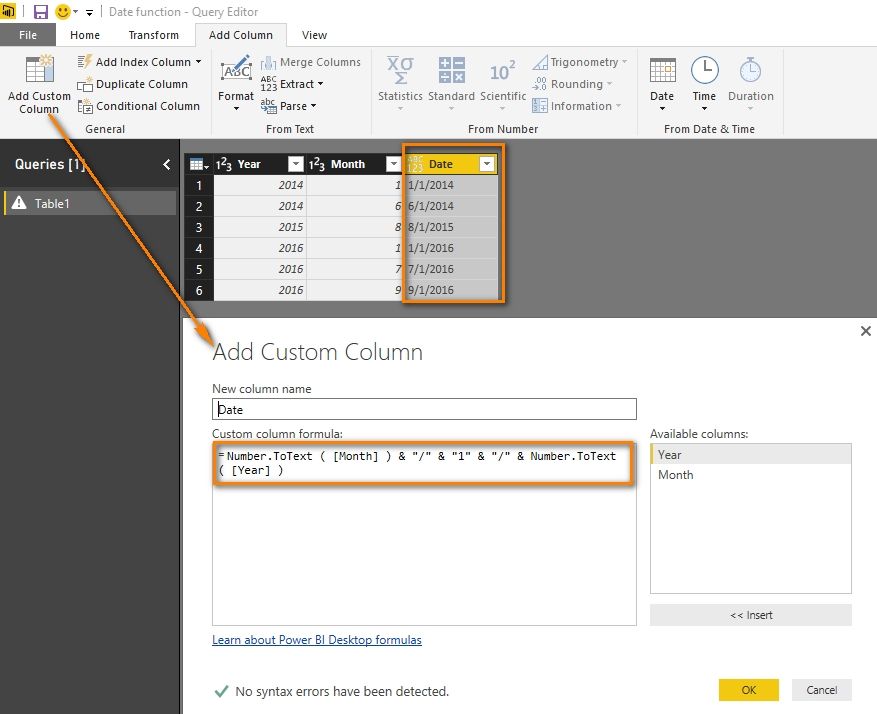
Then change the type of this column to “Date”.
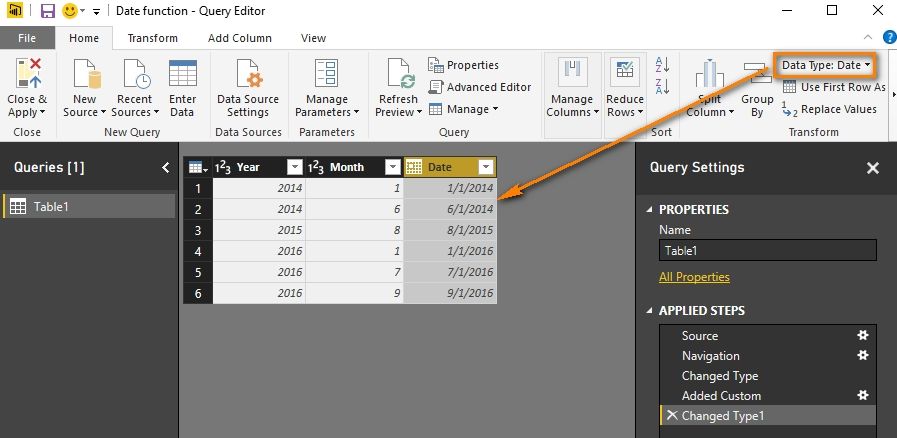
If you want to use DAX, please following the solution provided by Eno1978.
Best Regards,
Herbert
- Mark as New
- Bookmark
- Subscribe
- Mute
- Subscribe to RSS Feed
- Permalink
- Report Inappropriate Content
If you want to add the date column in Query Editor, you can add a custom column with following formula.
Number.ToText ( [Month] ) & "/" & "1" & "/" & Number.ToText ( [Year] )
Then change the type of this column to “Date”.
If you want to use DAX, please following the solution provided by Eno1978.
Best Regards,
Herbert

- Mark as New
- Bookmark
- Subscribe
- Mute
- Subscribe to RSS Feed
- Permalink
- Report Inappropriate Content
@pedroccamara Looks like something like this would work.
Date = FORMAT(([Month] & "/01/" & [Year]), "mm-dd'yyyy")
Then just change the Data Type to Date, and set to whatever format you want. My assumption is that since you don't have a "Day" that you would just default to the first day of the month.
- Mark as New
- Bookmark
- Subscribe
- Mute
- Subscribe to RSS Feed
- Permalink
- Report Inappropriate Content
Hello Eno
I've just change the field names like this ... FORMAT(([Mês] & "/01/" & [Ano]), "mm-dd'yyyy") and it gives me an expression error "The name FORMAT wasn't recognized"...
Any ideas?
- Mark as New
- Bookmark
- Subscribe
- Mute
- Subscribe to RSS Feed
- Permalink
- Report Inappropriate Content
@pedroccamara Are you attempting to do this in the query editor? If so, don't. The above solution is DAX, and you can implement by just right clicking on the table you want to apply the new column to and click on "New colomn" - this is where you would input the DAX syntax.
Using the query editor allows you to use "M" code to create columns etc. 2 different languages.
- Mark as New
- Bookmark
- Subscribe
- Mute
- Subscribe to RSS Feed
- Permalink
- Report Inappropriate Content
You're the MAN!!
Thank you very much
Best regards
Pedro
Helpful resources

Fabric Data Days 2026
Don't miss out on Data Days, June 15 through August 7. Learn Fabric, Power BI, SQL, AI and more.

Power BI Monthly Update - May 2026
Check out the May 2026 Power BI update to learn about new features.

Power BI DataViz World Championships - June 2026
A new Power BI DataViz World Championship is coming this June! Don't miss out on submitting your entry.

| User | Count |
|---|---|
| 22 | |
| 21 | |
| 20 | |
| 17 | |
| 13 |


| User | Count |
|---|---|
| 58 | |
| 50 | |
| 37 | |
| 29 | |
| 24 |


