Get certified for free when you join Fabric Data Days 2026 and dive into Fabric, Power BI, SQL, AI, and other essential data skills.
Join nowJuly 7 - July 17 | Round 2 of the Power BI Dataviz World Championships. Don't miss your chance! Learn more
Hi,
I have multiple date columns coming from SP as "Fri Nov 19 2021 19:31:44 GMT+0530 (India Standard Time)" this format and while converting into date, it is showing error. Any idea how to convert it ?
Thanks in advance ,
Switto
Solved! Go to Solution.
Hi All, We did some research and tried the option "Extract" and than "Range" in Add column in Power query as the data is same in all rows and worked fine.
@Switto , Follow the below steps:
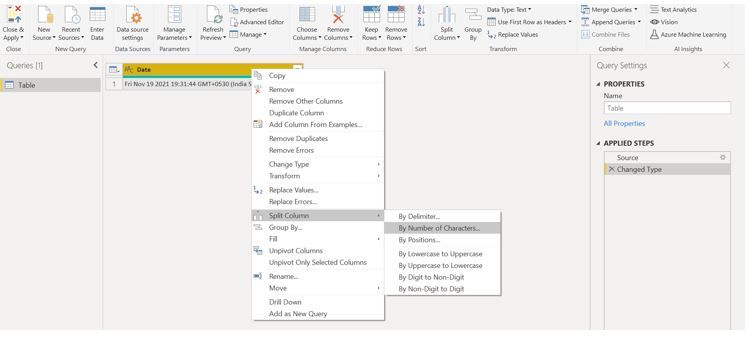
Step 1: Go to Power Query Editor
Step 2: Select your Date column and right click on it and select Split column
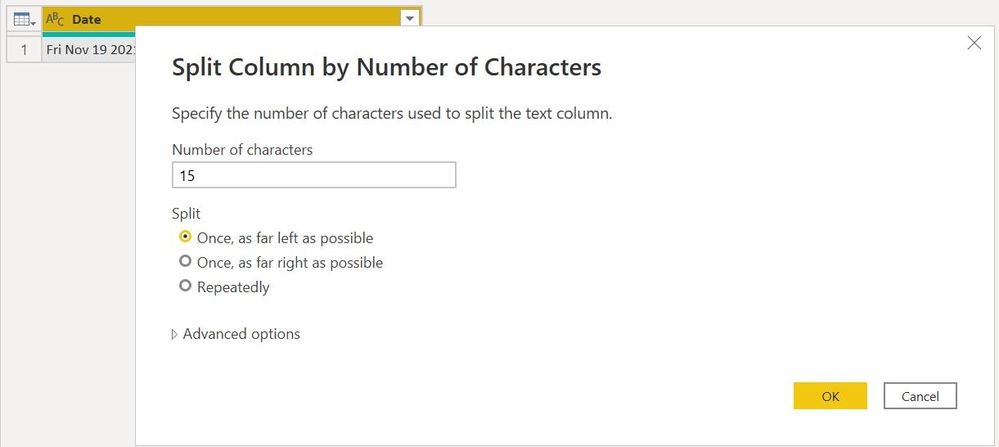
Step 3: Enter 15 like below and choose the first option
Step 4: You'll get the answer in the first column like this:
Hi All, We did some research and tried the option "Extract" and than "Range" in Add column in Power query as the data is same in all rows and worked fine.
Hi @Switto .
If it's data format is text, then you can't directly convert it to a date format.
Which mode did you use to import the file into your Power BI desktop?
You will need to change your format from there only.
Regards,
Sanket
If this post helps you give it a 👍 and if it solved your issue consider Accept it as the solution.
@Anonymous , Thanks for the quick reply. As it is an online ShrePoint list, I have connected data through SP Online list option.
Okay.
Then I would advise you to change its format in the Share Point list.
Join us in Barcelona for FabCon and SQLCon, the Fabric, Power BI, SQL, and AI community event. Save €200 with code FABCMTY200.
Join Data Days 2026: 60 days of free live/on-demand sessions, challenges, study groups, and certification opportunities.
| User | Count |
|---|---|
| 28 | |
| 23 | |
| 18 | |
| 18 | |
| 15 |
| User | Count |
|---|---|
| 47 | |
| 44 | |
| 43 | |
| 38 | |
| 32 |