cancel
Showing results for 
Search instead for 
Did you mean: 

The Power BI Data Visualization World Championships is back! Get ahead of the game and start preparing now! Learn more

Reply

Date filter hierarchy is showing all months even though the value for that month is not present

Hello All,


I have a date column in my dataset and using that date column-date hierarchy to filter table values.


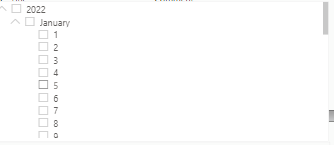
Date hierarchy silcer is showing all months and days even though the values for those months are not avaiable.


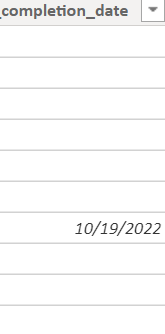
Date column:

Date column.png


Date Filter

Date Filter.png


We would like to show only 2022 year, October Month, 19 day in above filter example.


Please let me know how to do that.


Thank you!


Regards,

Ashwini


1 ACCEPTED SOLUTION

Below measure worked for me. Thank you for your time @amitchandak 


Created a measure like below, and applied it as a visual level filter on the slicer, filtered to 1.


SlicerFilter = INT ( NOT ISEMPTY ( FactTable ) )

View solution in original post

3 REPLIES 3

Below measure worked for me. Thank you for your time @amitchandak 


Created a measure like below, and applied it as a visual level filter on the slicer, filtered to 1.


SlicerFilter = INT ( NOT ISEMPTY ( FactTable ) )

Tried using Date table date column too.. It is also showing all months and days..

amitchandak
Super User
Super User

@ashuaswinireddy , better to create a date table with year, month, day etc., and use that in the slicer 


Calendar = Addcolumns(calendar(date(2020,01,01), date(2021,12,31) ), "Month no" , month([date])
, "Year", year([date])
, "Month Year", format([date],"mmm-yyyy")
, "Month year sort", year([date])*100 + month([date])
, "Qtr Year", format([date],"yyyy-\QQ")
, "Qtr", quarter([date])
, "Month",FORMAT([Date],"mmmm")
, "Month sort", month([DAte])
, "Is Today" ,if([Date]=TODAY(),"Today",[Date]&"")
,"Day of Year" , datediff(date(year([DAte]),1,1), [Date], day)+1
, "Month Type", Switch( True(),
eomonth([Date],0) = eomonth(Today(),-1),"Last Month" ,
eomonth([Date],0)= eomonth(Today(),0),"This Month" ,
Format([Date],"MMM-YYYY") )
,"Year Type" , Switch( True(),
year([Date])= year(Today()),"This Year" ,
year([Date])= year(Today())-1,"Last Year" ,
Format([Date],"YYYY")
)
)

Share with Power BI Enthusiasts: Full Power BI Video (20 Hours) YouTube
Microsoft Fabric Series 60+ Videos YouTube
Microsoft Fabric Hindi End to End YouTube

Helpful resources

Announcements
November Power BI Update Carousel

Power BI Monthly Update - November 2025

Check out the November 2025 Power BI update to learn about new features.

Fabric Data Days Carousel

Fabric Data Days

Advance your Data & AI career with 50 days of live learning, contests, hands-on challenges, study groups & certifications and more!

FabCon Atlanta 2026 carousel

FabCon Atlanta 2026

Join us at FabCon Atlanta, March 16-20, for the ultimate Fabric, Power BI, AI and SQL community-led event. Save $200 with code FABCOMM.