cancel
Showing results for 
Search instead for 
Did you mean: 

Get Fabric Certified for FREE during Fabric Data Days. Don't miss your chance! Request now

Reply
chris7777au
New Member

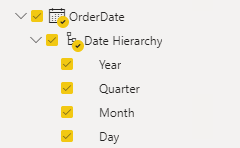
Date field is being displayed as date hierarchy [year][quater][month][day] in visual

Ok so i'll preface this by saying Im new to PowerBi datasets so if i've missed something obvious go easy!.


I am sourcing data from Dynamics Business Central via API.  A field i'm sourcing is the Order Date for a sales order.


If I select the Data tab, I can see the value in the data table as a single date (i.e. "03/05/2022") but in the Fields pane, the Order date is split with a Date Hierarchy, which seperates Year, Quarter, Month and Day.  When I attempt to put the field Order Date into a visualisation table, it automatically inserts 4 seperate Columns (Year,Quater,Month,Day) rather than one column being Order Date.  H


The Order Date field is showing as a Date Hierarchy.  How do I insert the Date rather than breaking it out inot the Date Hierarchy?


Order Date HierarchyOrder Date Hierarchy


Can someone point me either to the right way to fix this or some documentation?  


Thanks.

2 ACCEPTED SOLUTIONS
PC2790
Community Champion
Community Champion

As by default, time intellegence is enabled so the dates are automatically viewed as an heirarchy.

If you want to have single column of date in your visualisation, you can change the settings in your visualisation pane to use date as below:

PC2790_0-1652422142526.png


And if you want to remove this hierarchal structure all together, 

Go to  File --> Options and Settings --> Options --> Current File -> Data Load and turn  off 'Auto Date/Time' (under Time Intelligence)

But I would suggest to have it and change the view fro your visualisation base don your requirement

View solution in original post

jsaunders_zero9
Responsive Resident
Responsive Resident

In your visual try clicking the arrow drop down and changing it from Date Heirachy to Date.

jsaunders_zero9_0-1652422192988.png


View solution in original post

3 REPLIES 3
jsaunders_zero9
Responsive Resident
Responsive Resident

In your visual try clicking the arrow drop down and changing it from Date Heirachy to Date.

jsaunders_zero9_0-1652422192988.png


PC2790
Community Champion
Community Champion

As by default, time intellegence is enabled so the dates are automatically viewed as an heirarchy.

If you want to have single column of date in your visualisation, you can change the settings in your visualisation pane to use date as below:

PC2790_0-1652422142526.png


And if you want to remove this hierarchal structure all together, 

Go to  File --> Options and Settings --> Options --> Current File -> Data Load and turn  off 'Auto Date/Time' (under Time Intelligence)

But I would suggest to have it and change the view fro your visualisation base don your requirement

Absolute legend.  I'm learning where microsoft hides all the display functionality!  Thanks for pointing this out, really appreciate it.

Helpful resources

Announcements
November Power BI Update Carousel

Power BI Monthly Update - November 2025

Check out the November 2025 Power BI update to learn about new features.

Fabric Data Days Carousel

Fabric Data Days

Advance your Data & AI career with 50 days of live learning, contests, hands-on challenges, study groups & certifications and more!

FabCon Atlanta 2026 carousel

FabCon Atlanta 2026

Join us at FabCon Atlanta, March 16-20, for the ultimate Fabric, Power BI, AI and SQL community-led event. Save $200 with code FABCOMM.

Top Solution Authors
Top Kudoed Authors