Join us at FabCon Atlanta from March 16 - 20, 2026, for the ultimate Fabric, Power BI, AI and SQL community-led event. Save $200 with code FABCOMM.
Register now!The Power BI Data Visualization World Championships is back! It's time to submit your entry. Live now!
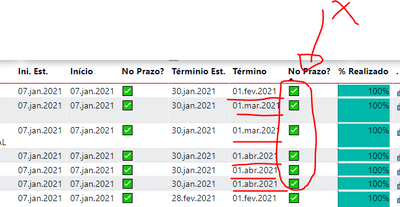
I had to change an excel file to sharepoint list. Now my formulas in Power Bi show wrong results
I changed regional configuration in sharepoint list and power bi but didn't work.
My formula:
Solved! Go to Solution.
@AleMacedo , Try with these modifications
Projetos Finalizados no Prazo =
SWITCH (
TRUE (),
isblank(max(cadProjetos[DataConclusãoPrevista])), UNICHAR(63),
isblank(max(cadProjetos[DataTérminoReal])), UNICHAR(63),
max(cadProjetos[DataTérminoReal])<=max(cadProjetos[DataConclusãoPrevista]), UNICHAR(9989),
UNICHAR (9949)
)
I think that it was same error with unicode . I changed them (codes) and worked. Thank you all!
I create 2 new columns in sharepoint list to return "yes" or "no" to question: "On time?"
what I have to change in formula to compare texts?
If column= "yes" then show UNICHAR ( 9989 ), if column = "no", show UNICHAR ( 9949 ), if is blank() shows UNICHAR(63)?
Hi @AleMacedo
Do you want to change your data source from excel to sharepoint list, and the measure you built will show wrong result after you change your data source?
You build a measure by switch function. In No prazo?, all icons are unichar(9989). I need to know your data and data model. Could you share me a sample file by Onedrive for Business that will show error in measure? And it is better for you to show me the result you want by screenshot. This will make it easier for me to understand your measure logic.
Best Regards,
Rico Zhou
If this post helps, then please consider Accept it as the solution to help the other members find it more quickly.
nope, same error.
@AleMacedo , Try with these modifications
Projetos Finalizados no Prazo =
SWITCH (
TRUE (),
isblank(max(cadProjetos[DataConclusãoPrevista])), UNICHAR(63),
isblank(max(cadProjetos[DataTérminoReal])), UNICHAR(63),
max(cadProjetos[DataTérminoReal])<=max(cadProjetos[DataConclusãoPrevista]), UNICHAR(9989),
UNICHAR (9949)
)
The Power BI Data Visualization World Championships is back! It's time to submit your entry.
Check out the January 2026 Power BI update to learn about new features.
| User | Count |
|---|---|
| 56 | |
| 42 | |
| 41 | |
| 21 | |
| 21 |
| User | Count |
|---|---|
| 150 | |
| 107 | |
| 64 | |
| 36 | |
| 36 |