cancel
Showing results for 
Search instead for 
Did you mean: 

Vote for your favorite vizzies from the Power BI Dataviz World Championship submissions. Vote now!

Reply
socal225
Frequent Visitor

Date diff with duplicate values

Hello all,


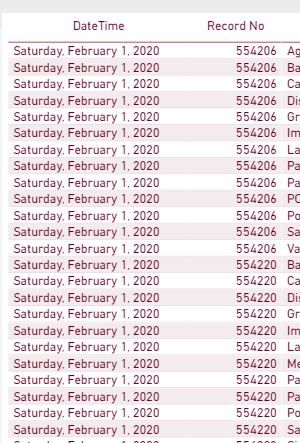
I am trying to create a calculated column that gives the age (in days) between a date in a column and the current date. I then want to create an additional measure based on this one. The date column has duplicate values in a second column called "record no," and the problem is that when I create the "age" measure it sums up the age on the duplicate "record no" column, and that affects the second measure based on other parameters. In a nutshell, I want to see the age for each "record no" based on the date, but I don't want it to aggregate based on the multiple duplicate rows of record no. Thank you in advance!


Capture.JPG

3 REPLIES 3
dax
Community Support
Community Support

Hi @socal225 , 

If possible could you please inform me more detailed information(such as your expected output and your sample data )? Then I will help you more correctly.

Please do mask sensitive data before uploading.

Thanks for your understanding and support.
Best Regards,
Zoe Zhi

If this post helps, then please consider Accept it as the solution to help the other members find it more quickly.

harshnathani
Community Champion
Community Champion

Hi @socal225 ,


What are the other measures?


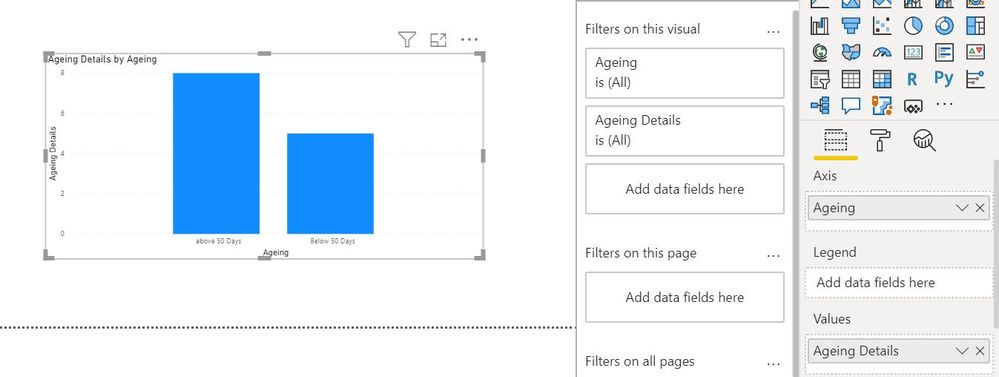
You can Calculated Columns


Days Elapsed = DATEDIFF('Table'[DateTime],Today(),DAY)
 
Ageing = IF (Table[Days Elapsed] > 50, "above 50 Days", "Below 50 Days")
 
 
and then create a measure
Ageing Details = COUNT(Table[RecordNo])
 
1.jpg


 Regards,
Harsh Nathani
 
jdbuchanan71
Super User
Super User

You could do it as a calcualted table that you link back to your main table based on the item number.


Table 2 =
ADDCOLUMNS (
    SUMMARIZE ( 'Table', 'Table'[Item], 'Table'[Date] ),
    "DateDiff", DATEDIFF ( 'Table'[Date], TODAY (), DAY )
)

If you can do it as a measure instead that might be easier.

DateDiff = 
VAR _ItemDate = SELECTEDVALUE('Table'[Date])
RETURN DATEDIFF(_ItemDate,TODAY(),DAY)


Helpful resources

Announcements
Power BI DataViz World Championships

Power BI Dataviz World Championships

Vote for your favorite vizzies from the Power BI World Championship submissions!

Sticker Challenge 2026 Carousel

Join our Community Sticker Challenge 2026

If you love stickers, then you will definitely want to check out our Community Sticker Challenge!

January Power BI Update Carousel

Power BI Monthly Update - January 2026

Check out the January 2026 Power BI update to learn about new features.

FabCon Atlanta 2026 carousel

FabCon Atlanta 2026

Join us at FabCon Atlanta, March 16-20, for the ultimate Fabric, Power BI, AI and SQL community-led event. Save $200 with code FABCOMM.