Hi @Infidti ,
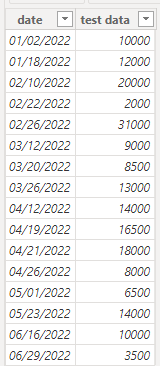
Since you didn't provide sample data, I created my own test set:
I also created an additional date sheet to create the slicer:
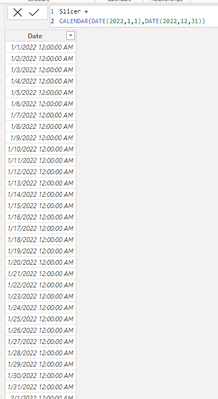
Since I don't know whether you are averaging the YTD values by the number of data records or by the total number of days, I'll provide you with two DAXs for each of these two averages:
YTD_PerData =
CALCULATE(
    AVERAGE('Table'[test data]),
    FILTER(
        ALL('Table'),
        'Table'[date] <= MAX('Slicer'[Date])
    )
)

YTD=(10000+12000+20000+2000+31000+9000+8500+13000)/8=13187.5
YTD_PerDay =
VAR Days_count = DATEDIFF(DATE(2022,1,1), MAX('Slicer'[Date]), DAY) + 1
VAR Date_count = CALCULATE(
    SUM('Table'[test data]),
    FILTER(
        ALL('Table'),
        'Table'[date] <= MAX('Slicer'[Date])
    )
)
RETURN
Date_count / Days_count
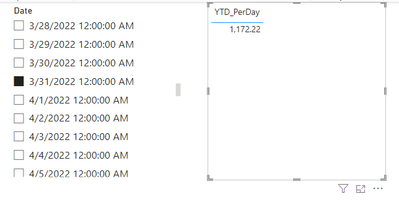
YTD=(10000+12000+20000+2000+31000+9000+8500+13000)/90(Total days between 2022.1.1 and 2022.3.31)=1172.2
And about QTR, -5 year and -10 year, could you please provide me with the sample data and the formula so that I can know how to use the DAX function to do the calculation?
Best Regards,
Dino Tao
If this post helps, then please consider Accept it as the solution to help the other members find it more quickly.


