cancel
Showing results for 
Search instead for 
Did you mean: 

The Power BI Data Visualization World Championships is back! Get ahead of the game and start preparing now! Learn more

Reply
charles_o
Helper I
Helper I

Date and Value Query Manipulation

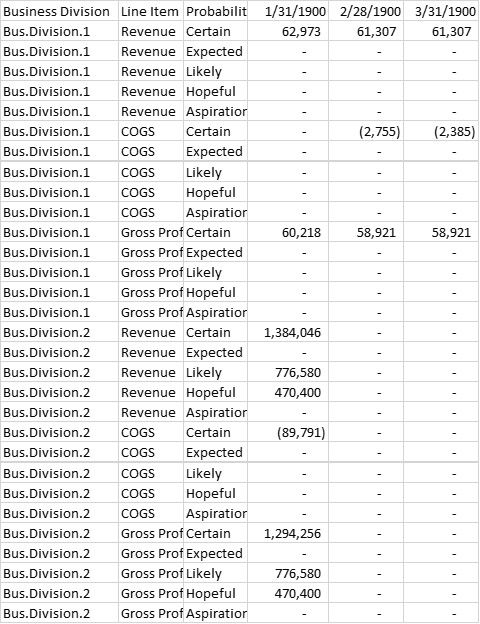
Hi- I have data presented in a similar format to this:


Picture1.jpg


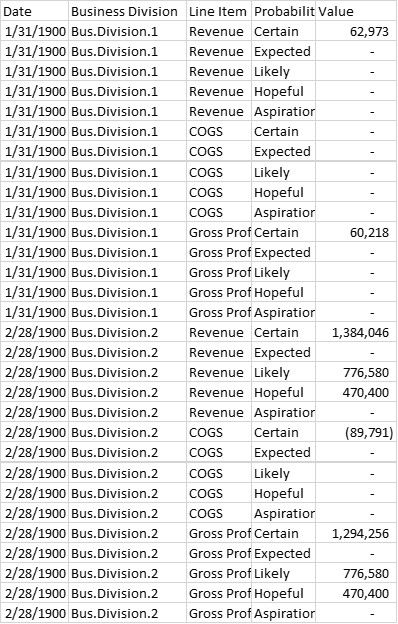
How can I manipulate this so it appears more like the picture below? (just an example, values are not correct when comparing the 2 charts)


Messed around a bit with it and was unabel to reproduce what I wanted.


I can index it in excel but figured it would be good to know how to do this in Power BI. Any suggestions? 


Picture2.jpg


1 ACCEPTED SOLUTION
jthomson
Solution Sage
Solution Sage

Go to Power Query, select your first three columns and unpivot the others

View solution in original post

1 REPLY 1
jthomson
Solution Sage
Solution Sage

Go to Power Query, select your first three columns and unpivot the others

Helpful resources

Announcements
Power BI DataViz World Championships

Power BI Dataviz World Championships

The Power BI Data Visualization World Championships is back! Get ahead of the game and start preparing now!

December 2025 Power BI Update Carousel

Power BI Monthly Update - December 2025

Check out the December 2025 Power BI Holiday Recap!

FabCon Atlanta 2026 carousel

FabCon Atlanta 2026

Join us at FabCon Atlanta, March 16-20, for the ultimate Fabric, Power BI, AI and SQL community-led event. Save $200 with code FABCOMM.