
cancel
Showing results for 
Search instead for 
Did you mean: 

Get Fabric certified for FREE! Don't miss your chance! Learn more

Reply
raulallas
Frequent Visitor

Date and User based RLS

I am trying to have a report that would automatically restrict access to users if their valid to date has expired.


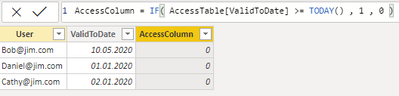
As the base for secuirity i have a 3 column table. 

raulallas_0-1596698356375.png

The User and ValidToDate column are imported from an independent source and AccessColumn is conditional on the ValidToDate column. 1 being good to go and 0 being no access.

raulallas_1-1596698484186.png

I have the role Viewer set up to check if the AccessColumn value is 1 and the user is listed. If both conditions are filled it should grant access. But my problem is that i can't get it to work. It seems to be stuck in the open position for all the users.


Any tips would be appreciated!

1 ACCEPTED SOLUTION
Anonymous
Not applicable

@raulallas 

What do you mean by can't get it work and stuck in the open position for all the users? Can you explain it more.


"If both conditions are filled it should grant access. " I don't really get that sense or I misunderstood. In your sample, RLS checks users account name and the Valid to date, if both matches the viewer should only see the rows that matches the conditions. In you case, viewers should see nothing. 


Please refer to the doc for how to get RLS work: https://docs.microsoft.com/en-us/power-bi/admin/service-admin-rls#:~:text=Row-level%20security%20%28....


Paul Zheng _ Community Support Team
If this post helps, then please consider Accept it as the solution to help the other members find it more quickly.

View solution in original post

3 REPLIES 3
Anonymous
Not applicable

@raulallas 

What do you mean by can't get it work and stuck in the open position for all the users? Can you explain it more.


"If both conditions are filled it should grant access. " I don't really get that sense or I misunderstood. In your sample, RLS checks users account name and the Valid to date, if both matches the viewer should only see the rows that matches the conditions. In you case, viewers should see nothing. 


Please refer to the doc for how to get RLS work: https://docs.microsoft.com/en-us/power-bi/admin/service-admin-rls#:~:text=Row-level%20security%20%28....


Paul Zheng _ Community Support Team
If this post helps, then please consider Accept it as the solution to help the other members find it more quickly.

amitchandak
Super User
Super User

@raulallas , I Need to try out something and check. refer to this video. It has explained RLS in detail.

Share with Power BI Enthusiasts: Full Power BI Video (20 Hours) YouTube
Microsoft Fabric Series 60+ Videos YouTube
Microsoft Fabric Hindi End to End YouTube

Hey @amitchandak !


Thanks for the video, but i think you forgot to link it :D!

Helpful resources

Announcements
Join our Fabric User Panel

Join our Fabric User Panel

Share feedback directly with Fabric product managers, participate in targeted research studies and influence the Fabric roadmap.

February Power BI Update Carousel

Power BI Monthly Update - February 2026

Check out the February 2026 Power BI update to learn about new features.

FabCon Atlanta 2026 carousel

FabCon Atlanta 2026

Join us at FabCon Atlanta, March 16-20, for the ultimate Fabric, Power BI, AI and SQL community-led event. Save $200 with code FABCOMM.