Get certified for free when you join Fabric Data Days 2026 and dive into Fabric, Power BI, SQL, AI, and other essential data skills.
Join nowData Days is here! Join us now for 60+ days of learning, challenges, and connection. Learn more
Dear all,
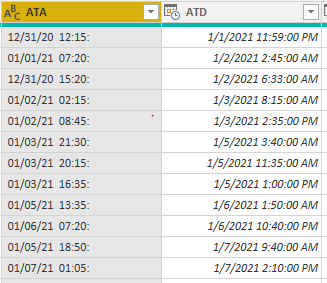
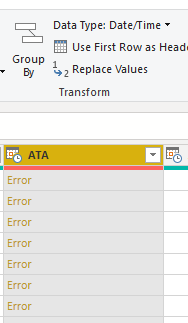
I'm facing a problem now as I input the data from Excel, the column "ATA" shows as Text instead of Date/Time (as "ATD) and cannot be shown as Date/Time.
But from Excel this two columns are in the same format and can even do calculations.
Any help would be appreciated.
Br,
Solved! Go to Solution.
@javieezy
The problem with the column ATA is, it has ":" at the end, do the following.
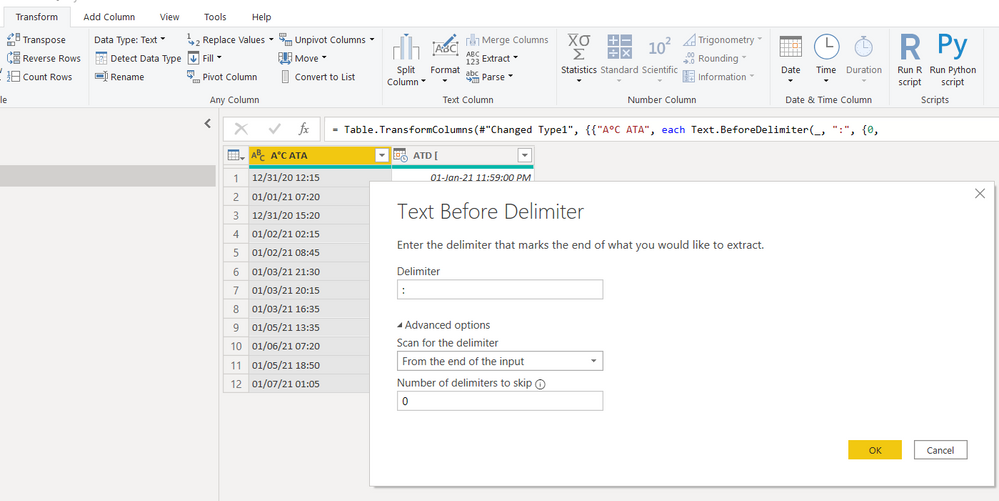
Go to: Transform > Extract > Text Before Delimiter and choose the options as I have done
Then change the column type to Date/Time.
Done
⭕ Subscribe and learn Power BI from these videos
⚪ Website ⚪ LinkedIn ⚪ PBI User Group
@javieezy
The problem with the column ATA is, it has ":" at the end, do the following.
Go to: Transform > Extract > Text Before Delimiter and choose the options as I have done
Then change the column type to Date/Time.
Done
⭕ Subscribe and learn Power BI from these videos
⚪ Website ⚪ LinkedIn ⚪ PBI User Group
@javieezy Can you share the file or at least the code from Advanced Editor in Power Query Editor? Almost looks like the first column is getting truncated for some reason.
Don't miss out on Data Days, June 15 through August 7. Learn Fabric, Power BI, SQL, AI and more.
Check out the May 2026 Power BI update to learn about new features.
| User | Count |
|---|---|
| 23 | |
| 21 | |
| 20 | |
| 19 | |
| 13 |
| User | Count |
|---|---|
| 58 | |
| 52 | |
| 37 | |
| 31 | |
| 27 |