Join us at FabCon Atlanta from March 16 - 20, 2026, for the ultimate Fabric, Power BI, AI and SQL community-led event. Save $200 with code FABCOMM.
Register now!The Power BI Data Visualization World Championships is back! It's time to submit your entry. Live now!
Dear All,
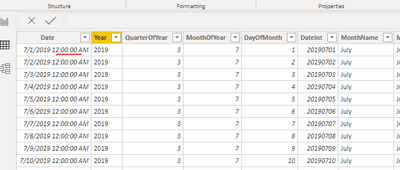
I have a sample data model with 3 tables, Date dimension, and two other transaction tables.
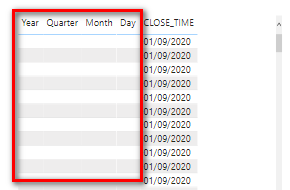
I am not able to see data from date dimension as below , if i select joined columns from both tables.
I have attached the sample pbix file.
https://drive.google.com/file/d/1orRByhaVHd7kQxqHgwHfhBgC5RNCtl4g/view?usp=sharing
Solved! Go to Solution.
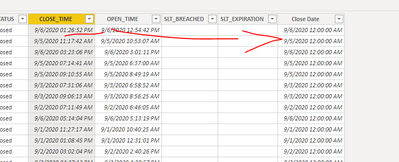
@sonuojha1 . close time has a timestamp. I create a date from this and then joined on that. Please find the file after signature
Hi @sonuojha1 ,
The purpose of creating this calculated column is to remove the timestamp.
You can also directly delete the timestamp of [CLOSE_TIME] in ‘Edit Query’.
Best regards,
Lionel Chen
If this post helps, then please consider Accept it as the solution to help the other members find it more quickly.
@sonuojha1 . close time has a timestamp. I create a date from this and then joined on that. Please find the file after signature
Why do we need new calculated column as
date(year([CLOSE_TIME]),month([CLOSE_TIME]),DAY([CLOSE_TIME])), however we have date column already in table?
What if we have multiple date columns, then it shouldn't be a good practice to recreate the date columns on top of existing date columns.
Best Regards,
Sonu
Thanks for reply,
Yes, it has timestamp in data, however I converted the data type from date time to Date. So as I understood, we have to remove timestamp from power query itself instead changing type in "Data" tab. Correct?
I appreciate your help.
The Power BI Data Visualization World Championships is back! It's time to submit your entry.
Check out the January 2026 Power BI update to learn about new features.
| User | Count |
|---|---|
| 56 | |
| 42 | |
| 41 | |
| 21 | |
| 21 |
| User | Count |
|---|---|
| 150 | |
| 106 | |
| 64 | |
| 37 | |
| 36 |