Get certified for free when you join Fabric Data Days 2026 and dive into Fabric, Power BI, SQL, AI, and other essential data skills.
Join nowJuly 7 - July 17 | Round 2 of the Power BI Dataviz World Championships. Don't miss your chance! Learn more
Dear All,
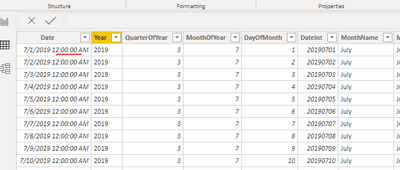
I have a sample data model with 3 tables, Date dimension, and two other transaction tables.
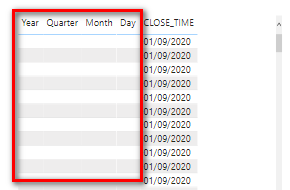
I am not able to see data from date dimension as below , if i select joined columns from both tables.
I have attached the sample pbix file.
https://drive.google.com/file/d/1orRByhaVHd7kQxqHgwHfhBgC5RNCtl4g/view?usp=sharing
Solved! Go to Solution.
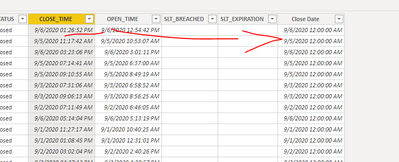
@sonuojha1 . close time has a timestamp. I create a date from this and then joined on that. Please find the file after signature
Hi @sonuojha1 ,
The purpose of creating this calculated column is to remove the timestamp.
You can also directly delete the timestamp of [CLOSE_TIME] in ‘Edit Query’.
Best regards,
Lionel Chen
If this post helps, then please consider Accept it as the solution to help the other members find it more quickly.
@sonuojha1 . close time has a timestamp. I create a date from this and then joined on that. Please find the file after signature
Why do we need new calculated column as
date(year([CLOSE_TIME]),month([CLOSE_TIME]),DAY([CLOSE_TIME])), however we have date column already in table?
What if we have multiple date columns, then it shouldn't be a good practice to recreate the date columns on top of existing date columns.
Best Regards,
Sonu
Thanks for reply,
Yes, it has timestamp in data, however I converted the data type from date time to Date. So as I understood, we have to remove timestamp from power query itself instead changing type in "Data" tab. Correct?
I appreciate your help.
Join us in Barcelona for FabCon and SQLCon, the Fabric, Power BI, SQL, and AI community event. Save €200 with code FABCMTY200.
Join Fabric Data Days 2026: 60 days of free live/on-demand sessions, challenges, study groups, and certification opportunities.
| User | Count |
|---|---|
| 23 | |
| 23 | |
| 17 | |
| 13 | |
| 13 |
| User | Count |
|---|---|
| 63 | |
| 41 | |
| 39 | |
| 38 | |
| 38 |