This is best Fabric, Power BI, SQL and AI community event. How do we know? The last event sold out! Save €200 with code FABCMTY200.
Register nowA new Data Days event is coming soon! This time we’re going bigger than ever. Fabric, Power BI, SQL, AI and more. Don't miss out.
Hi All,
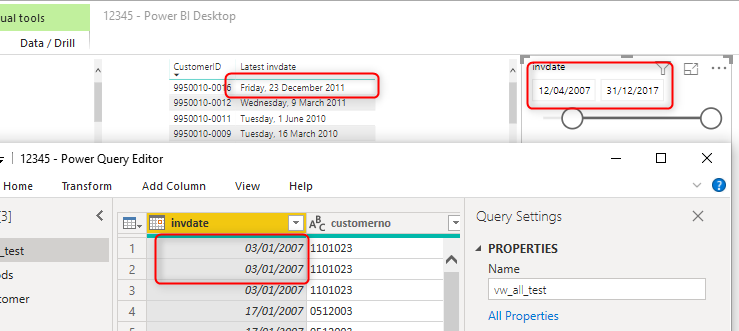
I have a table which is contain a date field, and i change it to "date only" on power query, and it shown correct under power query and slicer in PBI desktop.
however i create a table show customerno and lastest date, the it show the full date, see attached photo.
Is it possible to show the short date format on the table, just like the slicer and power query ?
Thanks in advance.
Joey
Solved! Go to Solution.
Select your Column Date and go to the Modeling tab. there is a data type there and format where you can change it.
thank you so much./Joey
Hi @joeytsui
Use the below formula to create a calculated column.
Check out the May 2026 Power BI update to learn about new features.
Sign up to receive a private message when registration opens and key events begin.
If you have recently started exploring Fabric, we'd love to hear how it's going. Your feedback can help with product improvements.
| User | Count |
|---|---|
| 29 | |
| 25 | |
| 25 | |
| 21 | |
| 14 |
| User | Count |
|---|---|
| 61 | |
| 49 | |
| 25 | |
| 20 | |
| 20 |