Get certified for free when you join Fabric Data Days 2026 and dive into Fabric, Power BI, SQL, AI, and other essential data skills.
Join nowData Days is here! Join us now for 60+ days of learning, challenges, and connection. Learn more
Hi,
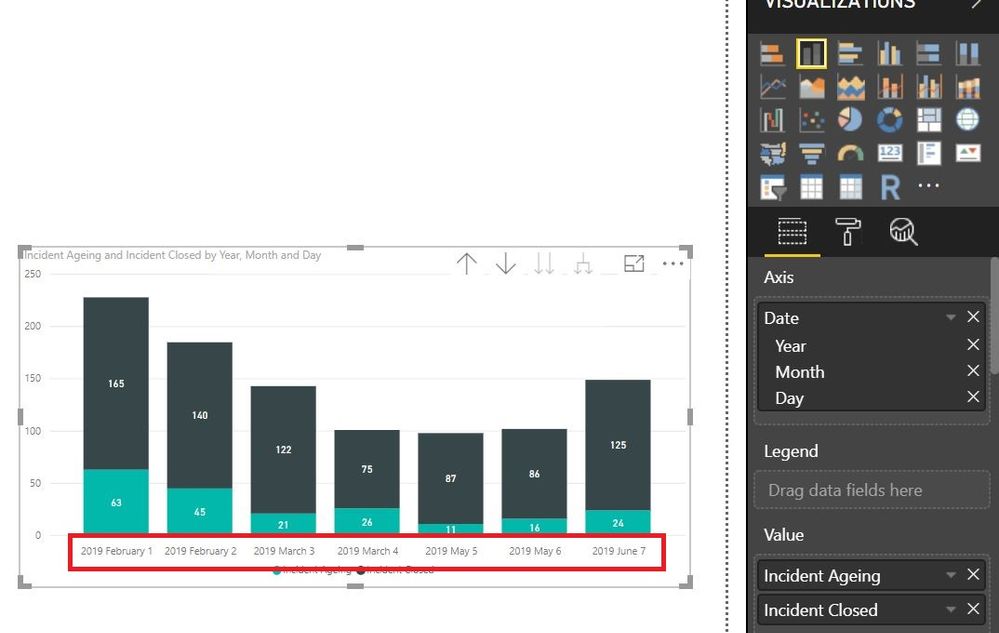
Can anyone help me to solve this... I have a data with custom date format dd/mm/yy. But when i create visual, why it appears long format date starts with yy/mm/dd?
How can i change it to be seen as per chart below starts with dd/mm/yy?
Thanks
Solved! Go to Solution.
1. Go to query editor.
2. In your table, right click on the date column and duplicate it first so that we still have the original column untouched.
3. Right click on your duplicate column, say Date-Copy, and select Change Type -> Using Locale
4. Set Data Type as Text, Locale as English (United Kingdom).
5. Close and Apply
6. Use Date-Copy along with your calculation. In the visual, sort it in ascending order.
1. Go to query editor.
2. In your table, right click on the date column and duplicate it first so that we still have the original column untouched.
3. Right click on your duplicate column, say Date-Copy, and select Change Type -> Using Locale
4. Set Data Type as Text, Locale as English (United Kingdom).
5. Close and Apply
6. Use Date-Copy along with your calculation. In the visual, sort it in ascending order.
Don't miss out on Data Days, June 15 through August 7. Learn Fabric, Power BI, SQL, AI and more.
Check out the May 2026 Power BI update to learn about new features.
| User | Count |
|---|---|
| 22 | |
| 21 | |
| 20 | |
| 19 | |
| 13 |
| User | Count |
|---|---|
| 58 | |
| 50 | |
| 38 | |
| 31 | |
| 27 |