Don't miss your chance to take the Fabric Data Engineer (DP-600) exam for FREE! Find out how by attending the DP-600 session on April 23rd (pacific time), live or on-demand.
Learn moreNext up in the FabCon + SQLCon recap series: The roadmap for Microsoft SQL and Maximizing Developer experiences in Fabric. All sessions are available on-demand after the live show. Register now
Hi,
One of my data contains a text field as below. Request help to convert it to date column by removing letters in Query editor
| Date |
| 2021-06-15T00:06:00Z |
Requirement
DATE
6/15/2021 12:06:00 AM
Thanks in advance
Suren
Solved! Go to Solution.
Hi @Anonymous
If you change value like 2021-06-15T00:06:00Z to Date/time format directly, it may show wrong datetime.
In my test, it will show 2021/06/15 08:06:00 AM in my test, this will be impacted by timezone.

If all date values are in type of xxxx/xx/xx T...Z. You can replace T by space and replace Z by null. Then change your data type as datetime.
Result is as below.
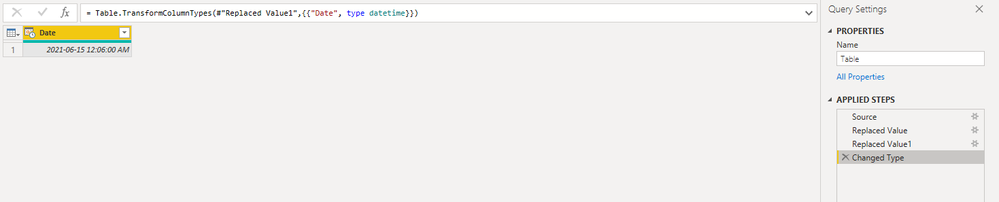
let
Source = Table.FromRows(Json.Document(Binary.Decompress(Binary.FromText("i45WMjIwMtQ1MNM1NA0xMLAyMLMyMIhSio0FAA==", BinaryEncoding.Base64), Compression.Deflate)), let _t = ((type nullable text) meta [Serialized.Text = true]) in type table [Date = _t]),
#"Replaced Value" = Table.ReplaceValue(Source,"T"," ",Replacer.ReplaceText,{"Date"}),
#"Replaced Value1" = Table.ReplaceValue(#"Replaced Value","Z","",Replacer.ReplaceText,{"Date"}),
#"Changed Type" = Table.TransformColumnTypes(#"Replaced Value1",{{"Date", type datetime}})
in
#"Changed Type"
Best Regards,
Rico Zhou
If this post helps, then please consider Accept it as the solution to help the other members find it more quickly.
Hi @Anonymous
If you change value like 2021-06-15T00:06:00Z to Date/time format directly, it may show wrong datetime.
In my test, it will show 2021/06/15 08:06:00 AM in my test, this will be impacted by timezone.
If all date values are in type of xxxx/xx/xx T...Z. You can replace T by space and replace Z by null. Then change your data type as datetime.
Result is as below.
let
Source = Table.FromRows(Json.Document(Binary.Decompress(Binary.FromText("i45WMjIwMtQ1MNM1NA0xMLAyMLMyMIhSio0FAA==", BinaryEncoding.Base64), Compression.Deflate)), let _t = ((type nullable text) meta [Serialized.Text = true]) in type table [Date = _t]),
#"Replaced Value" = Table.ReplaceValue(Source,"T"," ",Replacer.ReplaceText,{"Date"}),
#"Replaced Value1" = Table.ReplaceValue(#"Replaced Value","Z","",Replacer.ReplaceText,{"Date"}),
#"Changed Type" = Table.TransformColumnTypes(#"Replaced Value1",{{"Date", type datetime}})
in
#"Changed Type"
Best Regards,
Rico Zhou
If this post helps, then please consider Accept it as the solution to help the other members find it more quickly.
@Anonymous I was able to change that to a datetime:
let
Source = Table.FromRows(Json.Document(Binary.Decompress(Binary.FromText("i45WMjIwMtQ1MNM1NA0xMLAyMLMyMIhSio0FAA==", BinaryEncoding.Base64), Compression.Deflate)), let _t = ((type nullable text) meta [Serialized.Text = true]) in type table [Column1 = _t]),
#"Changed Type" = Table.TransformColumnTypes(Source,{{"Column1", type datetime}})
in
#"Changed Type"
If you need it as a date, just add a step to change the type to date after changing it to datetime.
Thank you Greg for your suggestion. But being a begginer i am unable to reproduce same at my end. Please let me know how it can be done with a "Custom Column"
Suren
If you have recently started exploring Fabric, we'd love to hear how it's going. Your feedback can help with product improvements.
A new Power BI DataViz World Championship is coming this June! Don't miss out on submitting your entry.
| User | Count |
|---|---|
| 47 | |
| 43 | |
| 39 | |
| 20 | |
| 15 |
| User | Count |
|---|---|
| 68 | |
| 68 | |
| 31 | |
| 27 | |
| 24 |