
Don't miss your chance to take the Fabric Data Engineer (DP-700) exam on us!
Learn moreWe've captured the moments from FabCon & SQLCon that everyone is talking about, and we are bringing them to the community, live and on-demand. Starts on April 14th. Register now
Hi,
One of my data contains a text field as below. Request help to convert it to date column by removing letters in Query editor
| Date |
| 2021-06-15T00:06:00Z |
Requirement
DATE
6/15/2021 12:06:00 AM
Thanks in advance
Suren
Solved! Go to Solution.
Hi @Anonymous
If you change value like 2021-06-15T00:06:00Z to Date/time format directly, it may show wrong datetime.
In my test, it will show 2021/06/15 08:06:00 AM in my test, this will be impacted by timezone.
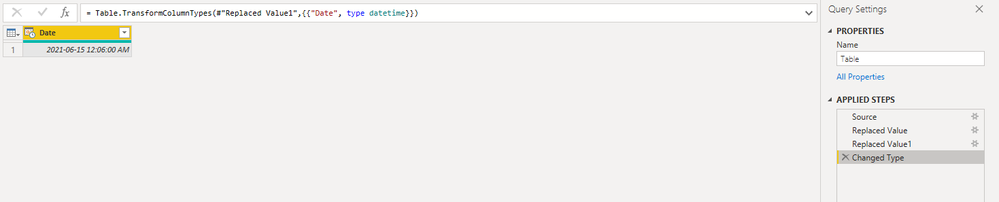
If all date values are in type of xxxx/xx/xx T...Z. You can replace T by space and replace Z by null. Then change your data type as datetime.
Result is as below.
let
Source = Table.FromRows(Json.Document(Binary.Decompress(Binary.FromText("i45WMjIwMtQ1MNM1NA0xMLAyMLMyMIhSio0FAA==", BinaryEncoding.Base64), Compression.Deflate)), let _t = ((type nullable text) meta [Serialized.Text = true]) in type table [Date = _t]),
#"Replaced Value" = Table.ReplaceValue(Source,"T"," ",Replacer.ReplaceText,{"Date"}),
#"Replaced Value1" = Table.ReplaceValue(#"Replaced Value","Z","",Replacer.ReplaceText,{"Date"}),
#"Changed Type" = Table.TransformColumnTypes(#"Replaced Value1",{{"Date", type datetime}})
in
#"Changed Type"
Best Regards,
Rico Zhou
If this post helps, then please consider Accept it as the solution to help the other members find it more quickly.
Hi @Anonymous
If you change value like 2021-06-15T00:06:00Z to Date/time format directly, it may show wrong datetime.
In my test, it will show 2021/06/15 08:06:00 AM in my test, this will be impacted by timezone.
If all date values are in type of xxxx/xx/xx T...Z. You can replace T by space and replace Z by null. Then change your data type as datetime.
Result is as below.
let
Source = Table.FromRows(Json.Document(Binary.Decompress(Binary.FromText("i45WMjIwMtQ1MNM1NA0xMLAyMLMyMIhSio0FAA==", BinaryEncoding.Base64), Compression.Deflate)), let _t = ((type nullable text) meta [Serialized.Text = true]) in type table [Date = _t]),
#"Replaced Value" = Table.ReplaceValue(Source,"T"," ",Replacer.ReplaceText,{"Date"}),
#"Replaced Value1" = Table.ReplaceValue(#"Replaced Value","Z","",Replacer.ReplaceText,{"Date"}),
#"Changed Type" = Table.TransformColumnTypes(#"Replaced Value1",{{"Date", type datetime}})
in
#"Changed Type"
Best Regards,
Rico Zhou
If this post helps, then please consider Accept it as the solution to help the other members find it more quickly.
@Anonymous I was able to change that to a datetime:
let
Source = Table.FromRows(Json.Document(Binary.Decompress(Binary.FromText("i45WMjIwMtQ1MNM1NA0xMLAyMLMyMIhSio0FAA==", BinaryEncoding.Base64), Compression.Deflate)), let _t = ((type nullable text) meta [Serialized.Text = true]) in type table [Column1 = _t]),
#"Changed Type" = Table.TransformColumnTypes(Source,{{"Column1", type datetime}})
in
#"Changed Type"
If you need it as a date, just add a step to change the type to date after changing it to datetime.
Thank you Greg for your suggestion. But being a begginer i am unable to reproduce same at my end. Please let me know how it can be done with a "Custom Column"
Suren
If you have recently started exploring Fabric, we'd love to hear how it's going. Your feedback can help with product improvements.
A new Power BI DataViz World Championship is coming this June! Don't miss out on submitting your entry.
Share feedback directly with Fabric product managers, participate in targeted research studies and influence the Fabric roadmap.
| User | Count |
|---|---|
| 55 | |
| 40 | |
| 35 | |
| 19 | |
| 18 |
| User | Count |
|---|---|
| 71 | |
| 70 | |
| 38 | |
| 35 | |
| 23 |