cancel
Showing results for 
Search instead for 
Did you mean: 

Join the FabCon + SQLCon recap series. Up next: Power BI, Real-Time Intelligence, IQ and AI, and Data Factory take center stage. All sessions are available on-demand after the live show. Register now

Reply
Niraj_vora0106
Helper III
Helper III

Date Error

Hi community, 


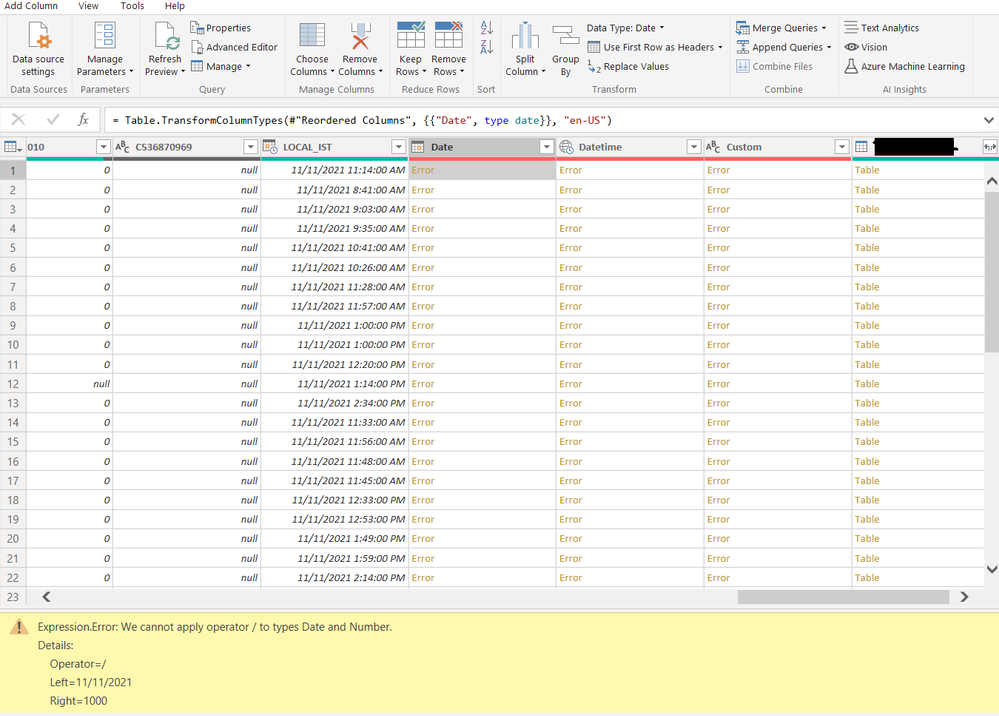
I'm getting this following error in my Date columns, 

Can anyone please help me out as I've encountered this Error for the first time.

Untitled.png In Dates Column I'm getting this Error,


And in Datetime and Custom column I'm getting the following Error : 


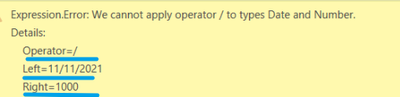
Expression.Error: We cannot convert the value #date(2021, 11, 11) to type Number.
Details:
Value=11/11/2021
Type=[Type]

1 ACCEPTED SOLUTION
Anonymous
Not applicable

Hey, 

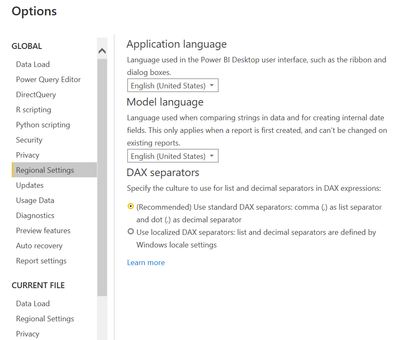
To avoid this issue, change regional settings of Power BI Dekstop

MargaritaG_0-1643181242426.png

Alternatively, you can just do it in PowerQuery. Change type using Locale 

MargaritaG_1-1643182314780.png

It's impoprtant to fist let Power Query  identify correctly date and then proceed with further transformations.
E.g. if you have Date/Time, then first change it with Locale to Date/Time format and only then to Date 

Hope this helps


View solution in original post

5 REPLIES 5
Anonymous
Not applicable

Hey, 

To avoid this issue, change regional settings of Power BI Dekstop

MargaritaG_0-1643181242426.png

Alternatively, you can just do it in PowerQuery. Change type using Locale 

MargaritaG_1-1643182314780.png

It's impoprtant to fist let Power Query  identify correctly date and then proceed with further transformations.
E.g. if you have Date/Time, then first change it with Locale to Date/Time format and only then to Date 

Hope this helps


v-janeyg-msft
Community Support
Community Support

Hi, @Niraj_vora0106 


Has the problem been solved? I've been waiting for your reply to follow up.

Hi @v-janeyg-msft 

The issue has been solved, in Power Query there was Calculation error.

v-janeyg-msft
Community Support
Community Support

Hi, @Niraj_vora0106 


The problem is what's your original data format. Normal date formats don't go wrong. Can you show it so we can help you fix it?

vjaneygmsft_1-1642734287079.png


Best Regards,
Community Support Team _ Janey

amitchandak
Super User
Super User

@Niraj_vora0106 , Can you check the data, I think there are different formats of date which is not working.

Also, check it before the first time the change data type is applied 

Share with Power BI Enthusiasts: Full Power BI Video (20 Hours) YouTube
Microsoft Fabric Series 60+ Videos YouTube
Microsoft Fabric Hindi End to End YouTube

Helpful resources

Announcements
April Power BI Update Carousel

Power BI Monthly Update - April 2026

Check out the April 2026 Power BI update to learn about new features.

New to Fabric survey Carousel

New to Fabric Survey

If you have recently started exploring Fabric, we'd love to hear how it's going. Your feedback can help with product improvements.

Power BI DataViz World Championships carousel

Power BI DataViz World Championships - June 2026

A new Power BI DataViz World Championship is coming this June! Don't miss out on submitting your entry.

FabCon and SQLCon Highlights Carousel

FabCon &SQLCon Highlights

Experience the highlights from FabCon & SQLCon, available live and on-demand starting April 14th.