Learn from the best! Meet the four finalists headed to the FINALS of the Power BI Dataviz World Championships! Register now
Hi
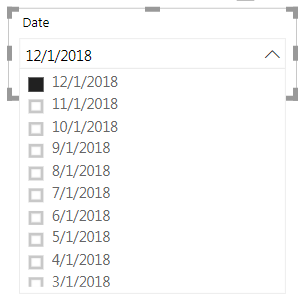
I am currently working on a dashboard and want to put the date column in the dropdown slicer.
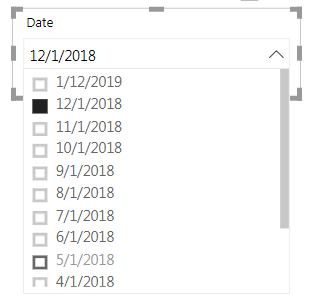
However, when I put new date into the Excel data file and refresh the dashboard, the date slicer still choose my previous chosen date (12/1/2018), not the most updated one (1/1/2019).
Is there any way that my dropdown date slicer will choose the latest date automatically?
Solved! Go to Solution.
HI, @Anonymous
Now when you log out of Power BI and come back to a report, the same items will be selected as when you left.
So for your requirement, it couldn't achieve that set a default value(or maxdate) for a slicer.
and as a workaround, you add a column to judge if the date is max date then set it in visual/page/report level filter or create a measure do the same work. eg. https://community.powerbi.com/t5/Service/How-to-set-a-time-slicer-to-select-the-latest-date-in-default/td-p/319202
Best Regards,
Lin
hi, @Anonymous
Could you please tell me if your problem has been solved? If it is, could you please mark the helpful replies as Answered? ![]()
Best Regards,
Lin
HI, @Anonymous
Now when you log out of Power BI and come back to a report, the same items will be selected as when you left.
So for your requirement, it couldn't achieve that set a default value(or maxdate) for a slicer.
and as a workaround, you add a column to judge if the date is max date then set it in visual/page/report level filter or create a measure do the same work. eg. https://community.powerbi.com/t5/Service/How-to-set-a-time-slicer-to-select-the-latest-date-in-default/td-p/319202
Best Regards,
Lin
| User | Count |
|---|---|
| 57 | |
| 43 | |
| 29 | |
| 17 | |
| 16 |
| User | Count |
|---|---|
| 73 | |
| 63 | |
| 44 | |
| 23 | |
| 22 |