cancel
Showing results for 
Search instead for 
Did you mean: 

Next up in the FabCon + SQLCon recap series: The roadmap for Microsoft SQL and Maximizing Developer experiences in Fabric. All sessions are available on-demand after the live show. Register now

Reply
RyanP
Advocate II
Advocate II

Date Display Formatting issues

 my regional settings set to short date - numeric date format.

The ONLY acceptable format for all numeric dates being YYYY-MM-DD.


The data in the query results is this format.

My regional settings are this format.


PowerBI displays it as DD/M/YYYY in slicers, in visuals, in show data tables, everywhere.

what's up with that / how do I force a global format for dates no matter what it is (slicer, visuals, see records, show data)

4 REPLIES 4
Anonymous
Not applicable

You can set the data types in Powe Query using the locale you select.

Setting Data Types using Locale.png

@Anonymous 


I did test your suggestion. It is not relevent (as noted the data tables show the data correctly. It's the visual that are using wrong formats

Should also note that your suggestion is not supported in direct query 😕

My data tables are displaying as desired.

However the visuals are not


@Anonymous wrote:

You can set the data types in Powe Query using the locale you select.

Setting Data Types using Locale.png


Anonymous
Not applicable

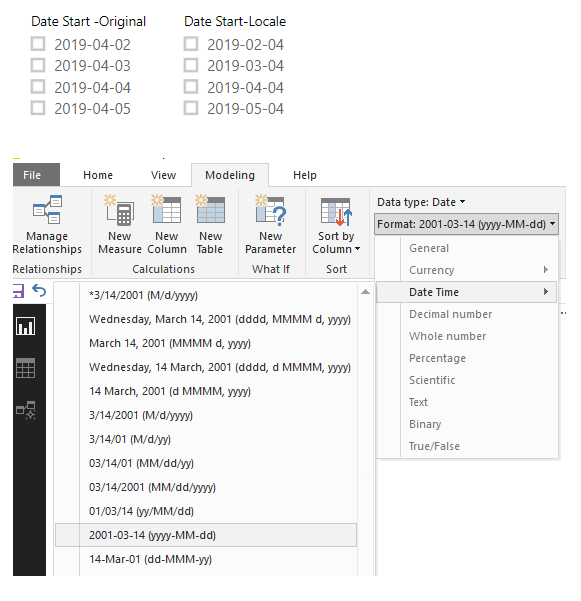
That should work. Just did a quick test and had dates in my locale and then duplicated them and changed to a different locale. Pulls in as they are in the column and just set the format to yyyy-mm-dd. 

Locale vs Original Dates.png

you could problably change the Regional Settings of the file too. File-->Options and Settings-->Options-->Current File-->Regional Settings

Helpful resources

Announcements
New to Fabric survey Carousel

New to Fabric Survey

If you have recently started exploring Fabric, we'd love to hear how it's going. Your feedback can help with product improvements.

Power BI DataViz World Championships carousel

Power BI DataViz World Championships - June 2026

A new Power BI DataViz World Championship is coming this June! Don't miss out on submitting your entry.

Join our Fabric User Panel

Join our Fabric User Panel

Share feedback directly with Fabric product managers, participate in targeted research studies and influence the Fabric roadmap.

March Power BI Update Carousel

Power BI Community Update - March 2026

Check out the March 2026 Power BI update to learn about new features.