cancel
Showing results for 
Search instead for 
Did you mean: 

Learn from the best! Meet the four finalists headed to the FINALS of the Power BI Dataviz World Championships! Register now

Reply
amtrakrob
Frequent Visitor

Date Difference between rows

Hello All...
I actually have 2 date related questions.

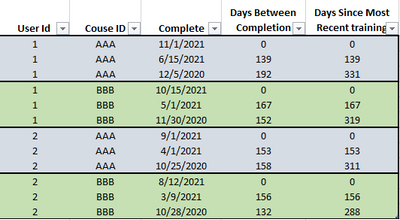
I have a training database. There are three columns. UserID, CourseID, CompleteDate. The database is sorted by UserID then CourseId then CompleteDate descending.  
1. I need a column that shows the number of days between each completedate.
2. I need a coulmn that shows the number of days between the completed date and MOST RECENT COMPLETE DATE.

I need the calculation to change for each couse, and then for each UserID

amtrakrob_1-1637349274341.png


Thanks everyone.


2 ACCEPTED SOLUTIONS
Anonymous
Not applicable

Hi @amtrakrob ,


Please try the following formula to create columns:

Rank = RANKX(FILTER('Table',[User Id]=EARLIER('Table'[User Id]) && [Course ID]=EARLIER('Table'[Course ID])),[Complete],,DESC)
Days Between Completion = 
var _pre=CALCULATE(MAX('Table'[Complete]),FILTER('Table',[User Id]=EARLIER('Table'[User Id]) && [Course ID]=EARLIER('Table'[Course ID]) && [Rank]=EARLIER('Table'[Rank])-1))
return DATEDIFF([Complete],_pre,DAY)+0
Days Since Most Recent Training = SUMX(FILTER('Table',[User Id]=EARLIER('Table'[User Id]) && [Course ID]=EARLIER('Table'[Course ID]) && [Complete]>=EARLIER('Table'[Complete])),[Days Between Completion])


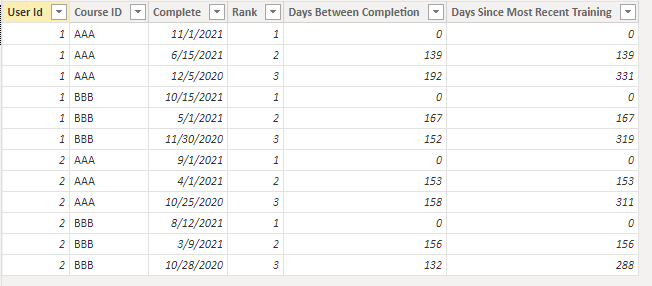
Output:

Eyelyn9_2-1637563838679.png


Best Regards,
Eyelyn Qin
If this post helps, then please consider Accept it as the solution to help the other members find it more quickly

View solution in original post

PERFECT!!!!!!
Thank you!

View solution in original post

3 REPLIES 3
Anonymous
Not applicable

Hi @amtrakrob ,


Please try the following formula to create columns:

Rank = RANKX(FILTER('Table',[User Id]=EARLIER('Table'[User Id]) && [Course ID]=EARLIER('Table'[Course ID])),[Complete],,DESC)
Days Between Completion = 
var _pre=CALCULATE(MAX('Table'[Complete]),FILTER('Table',[User Id]=EARLIER('Table'[User Id]) && [Course ID]=EARLIER('Table'[Course ID]) && [Rank]=EARLIER('Table'[Rank])-1))
return DATEDIFF([Complete],_pre,DAY)+0
Days Since Most Recent Training = SUMX(FILTER('Table',[User Id]=EARLIER('Table'[User Id]) && [Course ID]=EARLIER('Table'[Course ID]) && [Complete]>=EARLIER('Table'[Complete])),[Days Between Completion])


Output:

Eyelyn9_2-1637563838679.png


Best Regards,
Eyelyn Qin
If this post helps, then please consider Accept it as the solution to help the other members find it more quickly

PERFECT!!!!!!
Thank you!

amtrakrob
Frequent Visitor

Sorry... I should have said. I'm doing this in Power BI, and then these to be columns on my visual.

Helpful resources

Announcements
New to Fabric survey Carousel

New to Fabric Survey

If you have recently started exploring Fabric, we'd love to hear how it's going. Your feedback can help with product improvements.

Power BI DataViz World Championships carousel

Power BI DataViz World Championships - June 2026

A new Power BI DataViz World Championship is coming this June! Don't miss out on submitting your entry.

Join our Fabric User Panel

Join our Fabric User Panel

Share feedback directly with Fabric product managers, participate in targeted research studies and influence the Fabric roadmap.

March Power BI Update Carousel

Power BI Community Update - March 2026

Check out the March 2026 Power BI update to learn about new features.