Join us at FabCon Atlanta from March 16 - 20, 2026, for the ultimate Fabric, Power BI, AI and SQL community-led event. Save $200 with code FABCOMM.
Register now!Learn from the best! Meet the four finalists headed to the FINALS of the Power BI Dataviz World Championships! Register now
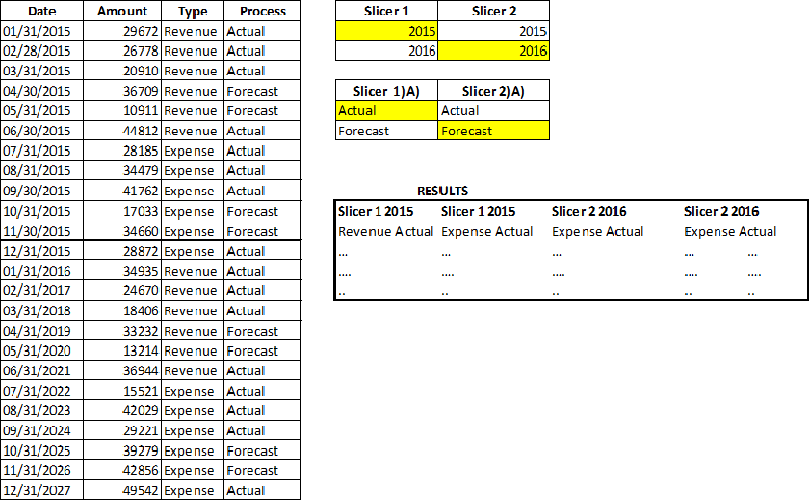
*** under slicer 2 in the result table should be forecast and the rows should be month rows.
Hello,
The objective is to get table where I can dynamically choose the date/process combinations.
My Steps to solve this:
My Problem:
I cannot find a way to have my calendar table slice on 2015 and 2016 for Slicer 1 & Slicer 2.
Any way to tackle this in another way ?
Solved! Go to Solution.
Hi @collmomo,
Based on my understanding, you want to display Revenues and Expenses based on filtered year and process, right?
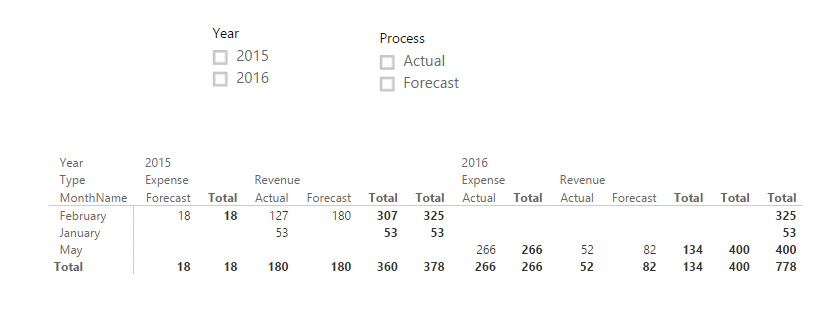
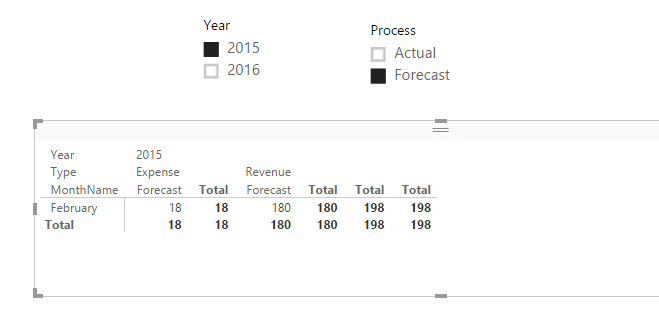
In my opinion, you can create columns to return Year and MonthName, then create a matrix visual to display values. Use two slicers to filter year and process values. See:
Best Regards,
Qiuyun Yu
Hi @collmomo,
Based on my understanding, you want to display Revenues and Expenses based on filtered year and process, right?
In my opinion, you can create columns to return Year and MonthName, then create a matrix visual to display values. Use two slicers to filter year and process values. See:
Best Regards,
Qiuyun Yu
Share feedback directly with Fabric product managers, participate in targeted research studies and influence the Fabric roadmap.
Check out the February 2026 Power BI update to learn about new features.
| User | Count |
|---|---|
| 61 | |
| 54 | |
| 39 | |
| 16 | |
| 14 |
| User | Count |
|---|---|
| 98 | |
| 84 | |
| 35 | |
| 30 | |
| 25 |