cancel
Showing results for 
Search instead for 
Did you mean: 

The Fabric community is upgrading! Read all of the details including the timeline and what you can expect. Learn more

Reply
Ning_pbi
Regular Visitor

Databrick connection Error

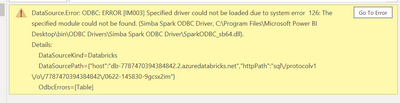
I had no problem to connect to the Azure Databricks in the desktop and then publish it before.  However, yesterday when I need to do some editing from the desktop version as usual, I got the error message as below: 

Ning_pbi_0-1655917171857.png

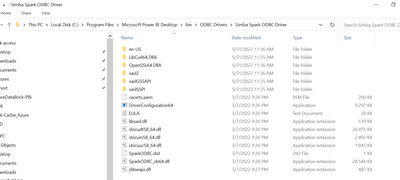
Following the error path, I did find the driver: 

Ning_pbi_1-1655917217150.png

What should I do?  


1 REPLY 1
Anonymous
Not applicable

Hi @Ning_pbi ,


Please download and install the latest ODBC driver. Then follow the steps to configure it.

https://docs.microsoft.com/en-us/azure/databricks/integrations/bi/jdbc-odbc-bi#--odbc-driver 


Best Regards,

Jay

Helpful resources

Announcements
FabCon and SQLCon Barcelona 2026

FabCon & SQLCon – Barcelona 2026

Join us in Barcelona for FabCon and SQLCon, the Fabric, Power BI, SQL, and AI community event. Save €200 with code FABCMTY200.

Power BI DataViz World Championships carousel

Power BI DataViz World Championships - June 2026

A new Power BI DataViz World Championship is coming this June! Don't miss out on submitting your entry.