cancel
Showing results for 
Search instead for 
Did you mean: 

Learn from the best! Meet the four finalists headed to the FINALS of the Power BI Dataviz World Championships! Register now

Reply
Strider_Elessar
New Member

Database structure - create relationships

Dear all, I'm quite new in the Power BI. We use a sort of ERP and power BI is linked to it. I can see the databases and it seems that in order to create proper relationships I might have to change a bit the structure.

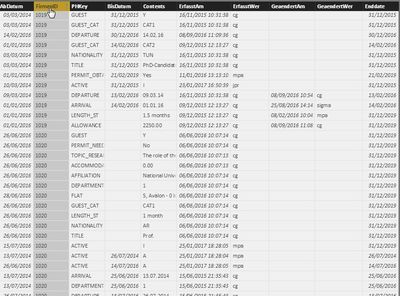
Indeed it looks like this:

2017_03_09_12_00_45_Guest_presence_test_Power_BI_Desktop.jpg

This table is then linked to another one through the FirmenID that returns the names, etc.

The column "PHKeys" refers to attributes in the ERP and it's quite difficule to then create relationships between them.

I tried to duplicate the table into small ones, but then the relationship doesn't seems to work between the duplicates.

And I'm not even mentionning the dates!

Any idea?

5 REPLIES 5
Eric_Zhang
Microsoft Employee
Microsoft Employee

@Strider_Elessar

According to your description, it seems not too duplicated. A relationship based on my understanding would be like


Capture.PNG

Hi,

Thanks for your feedback, then how can I search and get info from the DB with more than 1 criteria ?

Indeed I would need the date > than a date to be selected in a slicer + a certain value from the PHKey to return a value from the Content column?

@Strider_Elessar

As long as the relationship is set up properly, you can use 2 slicers, one for Dim_Date[date] and another for Attributes[PHKEY]. They two cooperate to fliter the data. There exists interactions amont visuals.


Hi,

is it also possible to have 3 slicers :

-two on the attributes PHKEY first would be about the department and second one about the category

-on for the date?

If so, how?


Thanks!


@Strider_Elessar wrote:

Hi,

is it also possible to have 3 slicers :

-two on the attributes PHKEY first would be about the department and second one about the category

-on for the date?

If so, how?


Thanks!


@Strider_Elessar

Using what in the slicers is all depending on your data model and requirement. By the way, I don't quite get category in your post.

Helpful resources

Announcements
Power BI DataViz World Championships carousel

Power BI DataViz World Championships - June 2026

A new Power BI DataViz World Championship is coming this June! Don't miss out on submitting your entry.

Join our Fabric User Panel

Join our Fabric User Panel

Share feedback directly with Fabric product managers, participate in targeted research studies and influence the Fabric roadmap.

March Power BI Update Carousel

Power BI Community Update - March 2026

Check out the March 2026 Power BI update to learn about new features.