This time we’re going bigger than ever. Fabric, Power BI, SQL, AI and more. We're covering it all. You won't want to miss it.
Learn moreLevel up your Power BI skills this month - build one visual each week and tell better stories with data! Get started
Hi,
I'm looking to have a parameter that tells me the date/time that my database was refreshed. If I just create a calculated column with the NOW() function would that work? Would anything cause that value to change other than me pressing the data "Refresh" button?
Thanks,
CM
Solved! Go to Solution.
Hi @Anonymous,
You can get your answer from the below mentioned URL:
https://docs.microsoft.com/en-us/azure/devops/report/powerbi/add-last-refresh-time?view=azure-devops
Please mark this as a Solution so it may help others!
Two answers.
First answer:
You can make it as a column first on your data table. Then it should only be updated, when the data is updated. But you do need to offset it if you want to show the correct time online.
For my country it is NOW() + (02/24)
Reason for the offset, is the Now formula responds to were the actual data is being held, and not from the viewers, or yours position.
But if your country have daylight save time, then you will need to change this each time the time difference changes.
Second Answer:
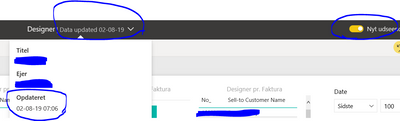
If it is to show online for the viewers, i would suggest, they switch over to the new Look, as this actualy shows the update time on the top. (Just noticed this today)
Hope this will help.
Two answers.
First answer:
You can make it as a column first on your data table. Then it should only be updated, when the data is updated. But you do need to offset it if you want to show the correct time online.
For my country it is NOW() + (02/24)
Reason for the offset, is the Now formula responds to were the actual data is being held, and not from the viewers, or yours position.
But if your country have daylight save time, then you will need to change this each time the time difference changes.
Second Answer:
If it is to show online for the viewers, i would suggest, they switch over to the new Look, as this actualy shows the update time on the top. (Just noticed this today)
Hope this will help.
Hi @Anonymous,
You can get your answer from the below mentioned URL:
https://docs.microsoft.com/en-us/azure/devops/report/powerbi/add-last-refresh-time?view=azure-devops
Please mark this as a Solution so it may help others!
Check out the April 2026 Power BI update to learn about new features.
Sign up to receive a private message when registration opens and key events begin.
If you have recently started exploring Fabric, we'd love to hear how it's going. Your feedback can help with product improvements.
| User | Count |
|---|---|
| 36 | |
| 33 | |
| 26 | |
| 24 | |
| 17 |
| User | Count |
|---|---|
| 67 | |
| 49 | |
| 32 | |
| 27 | |
| 22 |