Join us in Barcelona for FabCon and SQLCon, September 28 - October 1, 2026.
This is best Fabric, Power BI, SQL and AI community event. How do we know? The last event sold out! Save €200 with code FABCMTY200.
Register now- Power BI forums
- Get Help with Power BI
- Desktop
- Service
- Report Server
- Power Query
- Mobile Apps
- Developer
- DAX Commands and Tips
- Custom Visuals Development Discussion
- Health and Life Sciences
- Power BI Spanish forums
- Translated Spanish Desktop
- Training and Consulting
- Instructor Led Training
- Dashboard in a Day for Women, by Women
- Galleries
- Data Stories Gallery
- Themes Gallery
- Contests Gallery
- QuickViz Gallery
- Quick Measures Gallery
- Visual Calculations Gallery
- Fabric Apps Gallery
- Notebook Gallery
- Translytical Task Flow Gallery
- TMDL Gallery
- R Script Showcase
- Webinars and Video Gallery
- Ideas
- Custom Visuals Ideas (read-only)
- Issues
- Issues
- Events
- Upcoming Events
July 28 - August 9 | Final Round of the Power BI Dataviz World Championships. This is your chance. Learn more
- Power BI forums
- Forums
- Get Help with Power BI
- Desktop
- Re: Data type is wrong?
- Subscribe to RSS Feed
- Mark Topic as New
- Mark Topic as Read
- Float this Topic for Current User
- Bookmark
- Subscribe
- Printer Friendly Page

- Mark as New
- Bookmark
- Subscribe
- Mute
- Subscribe to RSS Feed
- Permalink
- Report Inappropriate Content
Data type is wrong?
Hi guys! First of all Happy New Year.
I´m working on a report for my work which has a lot of projects with their respective last update on the database. I´m making a function that calculates the days since the last update. The problem is that I´m having negative numbers and inconsistencies.
The function for the Column " Days since Last Update" is:
Days since Last Update = TODAY()-'TPA Portfolio'[Last Update Date]
It´s important to remark that the Last Update Date column is stated by PowerBI as a Text field and the format is DD/MM/YYYY (Argentinian date)
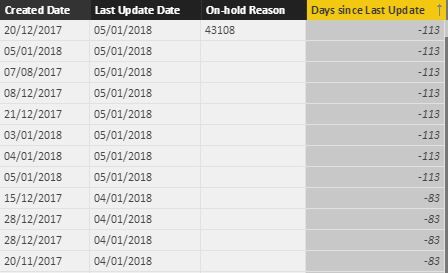
Thanks for your help...
Solved! Go to Solution.


- Mark as New
- Bookmark
- Subscribe
- Mute
- Subscribe to RSS Feed
- Permalink
- Report Inappropriate Content
Nowhere. It was just an example to illustrate the solution.
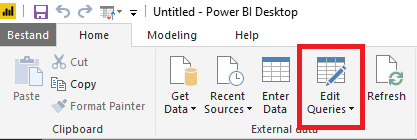
In your case, go to the Query Editor, select your column with textual dates and adjust the data type using Locale.
The video below illustrates how; it starts already in the Query Editor.


- Mark as New
- Bookmark
- Subscribe
- Mute
- Subscribe to RSS Feed
- Permalink
- Report Inappropriate Content
Hi @Anonymous,
What about using the datediff function for this issue...
Let us know
- Mark as New
- Bookmark
- Subscribe
- Mute
- Subscribe to RSS Feed
- Permalink
- Report Inappropriate Content
Days since Last Update = DATEDIFF(TODAY(),'TPA Portfolio'[Last Update Date],DAY)
And I´m getting: In DATEDIFF function, the start date cannot be greater than the end date
I think the Power BI is messing between the date format of my PC (which is English format mm/dd/yyyy) and the format of the data base
- Mark as New
- Bookmark
- Subscribe
- Mute
- Subscribe to RSS Feed
- Permalink
- Report Inappropriate Content
Check the syntax of the DATEDIFF function.
The start date should be supplied first.
- Mark as New
- Bookmark
- Subscribe
- Mute
- Subscribe to RSS Feed
- Permalink
- Report Inappropriate Content
I dont think that the syntax is the problem. I'm guessing that the problem is on the date formats.
- Mark as New
- Bookmark
- Subscribe
- Mute
- Subscribe to RSS Feed
- Permalink
- Report Inappropriate Content
In that case you have more than 1 problem.
You can convert text dates to real dates in the Query Editor.
And still you need to provide the earlier date as the first parameter to DATEDIFF.
You may think otherwise, but the syntax is quite clear:
DATEDIFF(<start_date>, <end_date>, <interval>)
You may consider providing more information if you want helpful help.
- Mark as New
- Bookmark
- Subscribe
- Mute
- Subscribe to RSS Feed
- Permalink
- Report Inappropriate Content
This query TPA Portfolio:
let
    Source = #table(type table[Last Update Date = text],{{"31/12/2017"}}),
    #"Changed Type" = Table.TransformColumnTypes(Source,{{"Last Update Date", type date}}, "es-AR")
in
    #"Changed Type"
works fine with this custom column:
Days since Last Update = DATEDIFF('TPA Portfolio'[Last Update Date],TODAY(),DAY)

Convinced?
- Mark as New
- Bookmark
- Subscribe
- Mute
- Subscribe to RSS Feed
- Permalink
- Report Inappropriate Content
First of all, I appreciate your help.
Where do I have to insert that syntax function?
let
    Source = #table(type table[Last Update Date = text],{{"31/12/2017"}}),
    #"Changed Type" = Table.TransformColumnTypes(Source,{{"Last Update Date", type date}}, "es-AR")
in
    #"Changed Type"
- Mark as New
- Bookmark
- Subscribe
- Mute
- Subscribe to RSS Feed
- Permalink
- Report Inappropriate Content
Nowhere. It was just an example to illustrate the solution.
In your case, go to the Query Editor, select your column with textual dates and adjust the data type using Locale.
The video below illustrates how; it starts already in the Query Editor.
Helpful resources

FabCon & SQLCon – Barcelona 2026
Join us in Barcelona for FabCon and SQLCon, the Fabric, Power BI, SQL, and AI community event. Save €200 with code FABCMTY200.

Fabric Community Sticker Challenge - Barcelona 2026
If you love stickers, then you will definitely want to check out our community sticker challenge, Barcelona edition!

Power BI Monthly Update - July 2026
Check out the July 2026 Power BI update to learn about new features.

Power BI DataViz World Championships - June 2026
A new Power BI DataViz World Championship is coming this June! Don't miss out on submitting your entry.

| User | Count |
|---|---|
| 25 | |
| 23 | |
| 19 | |
| 17 | |
| 14 |


| User | Count |
|---|---|
| 24 | |
| 23 | |
| 20 | |
| 20 | |
| 19 |


