Don't miss your chance to take the Fabric Data Engineer (DP-700) exam on us!
Learn moreWe've captured the moments from FabCon & SQLCon that everyone is talking about, and we are bringing them to the community, live and on-demand. Starts on April 14th. Register now
Hi
I have data in weeks and years
originally in excel it is in 1/2017.. 2/2017... 3/2017 format
In PBI query view i split the columnt to have week and year
week year
1 2017
2 2017
3 2017
I would like PBI to recognize this as date Data type so I can use it
Anyone can help ..
tahnx
Solved! Go to Solution.
Well, if you don't know what ISO is (despite my explanation...), then I guess your week numbering is like the system used in the USA, where the week starts on Sunday, January 1 is week 1 and week 2 starts on the first Sunday after January 1.
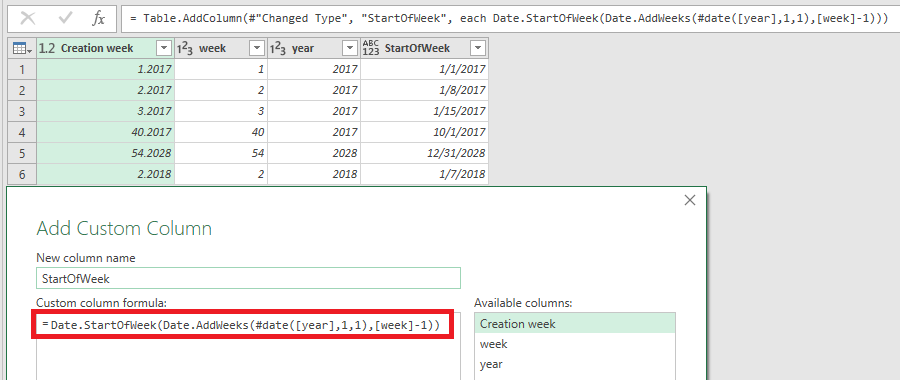
In that case, you can add a column with formula:
= Date.StartOfWeek(Date.AddWeeks(#date([year],1,1),[week]-1))
By the way, your "Creation week" is a number in Power Query with the year in the fraction part (i.e. as decimals).
If you are using ISO week numbering (i.e. Monday is the first day of the week and the first Thursday in a year is in week 1 and each ISO week has 7 days - also around January 1st) then refer to my solution over here.
hI Marcel
Thank you for quick response.
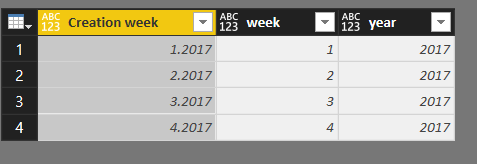
I am not sure what ISO means. however here are some pictures to get better idea what my issue is
THis is the orginal format
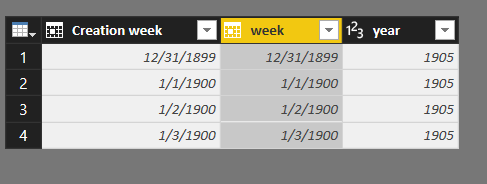
Here is what happens when I change the data type to date. In adition i tried to change the Year column into Date/Year/Year
Hope you can understand better.
I would like to have the same view as in the first picutre but the data type will be Date
Thank you
Well, if you don't know what ISO is (despite my explanation...), then I guess your week numbering is like the system used in the USA, where the week starts on Sunday, January 1 is week 1 and week 2 starts on the first Sunday after January 1.
In that case, you can add a column with formula:
= Date.StartOfWeek(Date.AddWeeks(#date([year],1,1),[week]-1))
By the way, your "Creation week" is a number in Power Query with the year in the fraction part (i.e. as decimals).
If you have recently started exploring Fabric, we'd love to hear how it's going. Your feedback can help with product improvements.
A new Power BI DataViz World Championship is coming this June! Don't miss out on submitting your entry.
Share feedback directly with Fabric product managers, participate in targeted research studies and influence the Fabric roadmap.
| User | Count |
|---|---|
| 53 | |
| 36 | |
| 33 | |
| 19 | |
| 17 |
| User | Count |
|---|---|
| 73 | |
| 72 | |
| 38 | |
| 35 | |
| 26 |