cancel
Showing results for 
Search instead for 
Did you mean: 

The Power BI Data Visualization World Championships is back! Get ahead of the game and start preparing now! Learn more

Reply
RonLieuw
Helper I
Helper I

Data source visible in template

I am using the free version of PBI, configured a report and saved the file as a template (pbit).

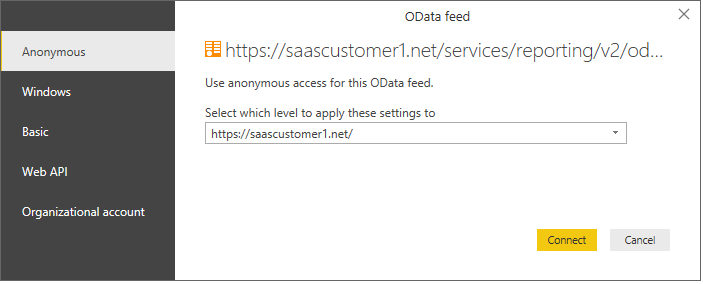
When I open the template I can see the original source url "saascustomer1.net", see screenshot below .

Is there a way to blank out the original url so I don't expose the url used to create the template?


Odatafeed.png

1 ACCEPTED SOLUTION
Anonymous
Not applicable

Hi @RonLieuw,


I think you are create wrong power bi template, normally it not contains connection string.

Please enter to query editor and use query parameter and invoke it as connector 's connection string, then save it as pbit.

Deep Dive into Query Parameters and Power BI Templates Miguel Llopis Senior Program Manager, Power B...


Regards,

Xiaoxin Sheng

View solution in original post

2 REPLIES 2
Anonymous
Not applicable

Hi @RonLieuw,


I think you are create wrong power bi template, normally it not contains connection string.

Please enter to query editor and use query parameter and invoke it as connector 's connection string, then save it as pbit.

Deep Dive into Query Parameters and Power BI Templates Miguel Llopis Senior Program Manager, Power B...


Regards,

Xiaoxin Sheng

Xiaoxin Sheng,thank you for the reaction.

I found out what I want to do can be bsest done as a Custom visual service!

Helpful resources

Announcements
November Power BI Update Carousel

Power BI Monthly Update - November 2025

Check out the November 2025 Power BI update to learn about new features.

Fabric Data Days Carousel

Fabric Data Days

Advance your Data & AI career with 50 days of live learning, contests, hands-on challenges, study groups & certifications and more!

FabCon Atlanta 2026 carousel

FabCon Atlanta 2026

Join us at FabCon Atlanta, March 16-20, for the ultimate Fabric, Power BI, AI and SQL community-led event. Save $200 with code FABCOMM.

Top Kudoed Authors