Don't miss your chance to take exam DP-600 or DP-700 on us!
Request nowLearn from the best! Meet the four finalists headed to the FINALS of the Power BI Dataviz World Championships! Register now
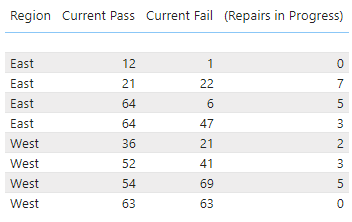
I'm looking for a way to sum the values into just East and West so I don't have four lines for each. I'm new to Power BI so it could just be an issue with how I imported my data. Is there something easy in the settings I missed or do I need to adjust my data import? Thank you
Solved! Go to Solution.
Hi @Dbstedman ,
Whenever you move certain columns to Power BI table visual, if they are of numeric type they should summarise themselves by default to SUM.
What are the data-types of all the columns in your screenshot above?
Check this one,
Regards,
Ritesh
I found my mistake. The number coloumns were set to "Don't Summarize". Thanks for the help!
Hi @Dbstedman ,
Whenever you move certain columns to Power BI table visual, if they are of numeric type they should summarise themselves by default to SUM.
What are the data-types of all the columns in your screenshot above?
The first column should be text and the next three are whole numbers.
Share feedback directly with Fabric product managers, participate in targeted research studies and influence the Fabric roadmap.
Check out the February 2026 Power BI update to learn about new features.
| User | Count |
|---|---|
| 51 | |
| 40 | |
| 37 | |
| 14 | |
| 14 |
| User | Count |
|---|---|
| 85 | |
| 69 | |
| 38 | |
| 29 | |
| 27 |