Learn from the best! Meet the four finalists headed to the FINALS of the Power BI Dataviz World Championships! Register now
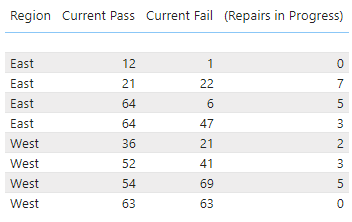
I'm looking for a way to sum the values into just East and West so I don't have four lines for each. I'm new to Power BI so it could just be an issue with how I imported my data. Is there something easy in the settings I missed or do I need to adjust my data import? Thank you
Solved! Go to Solution.
Hi @Dbstedman ,
Whenever you move certain columns to Power BI table visual, if they are of numeric type they should summarise themselves by default to SUM.
What are the data-types of all the columns in your screenshot above?
Check this one,
Regards,
Ritesh
I found my mistake. The number coloumns were set to "Don't Summarize". Thanks for the help!
Hi @Dbstedman ,
Whenever you move certain columns to Power BI table visual, if they are of numeric type they should summarise themselves by default to SUM.
What are the data-types of all the columns in your screenshot above?
The first column should be text and the next three are whole numbers.
| User | Count |
|---|---|
| 55 | |
| 37 | |
| 23 | |
| 17 | |
| 17 |
| User | Count |
|---|---|
| 69 | |
| 58 | |
| 39 | |
| 21 | |
| 21 |