Join us at FabCon Atlanta from March 16 - 20, 2026, for the ultimate Fabric, Power BI, AI and SQL community-led event. Save $200 with code FABCOMM.
Register now!Learn from the best! Meet the four finalists headed to the FINALS of the Power BI Dataviz World Championships! Register now
Hi all,
New to Power BI and have come across a dataset that I am exploring and have an issue that I don't know how to solve when it comes to modelling and building relationships.
I was hoping to get some help from the community.
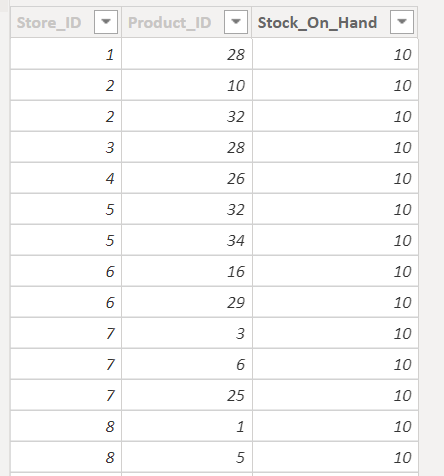
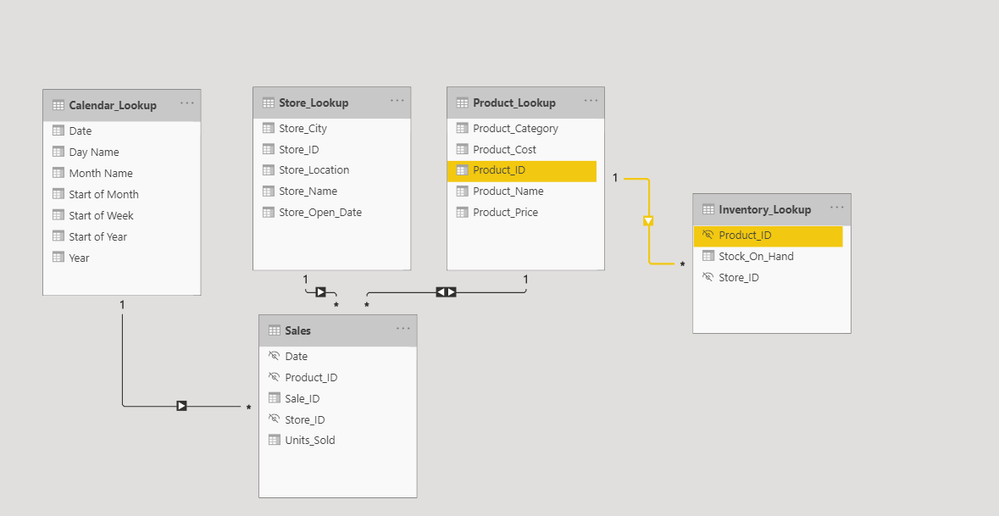
I have this table with three columns that I have renamed to "Inventory_Lookup" (see pic) that I'm not able to connect correctly. I have listed my questions below.
- Is this a lookup/dimension table? Or is it actually a fact/data table?
- How do I connect it properly since there are no unique values in the table? Have I done it the right way as shown in the picture (both directions from sales table to product_lookup and one to many from product_lookup to Inventory_lookup)?
Thanks in advance.
Solved! Go to Solution.
Hi @Clay82 ,
But, yes all the relationships in a data model depend on what you re planning to analyse in your report and at what granularity.
Thanks,
Pragati
Hi @Clay82 ,
But, yes all the relationships in a data model depend on what you re planning to analyse in your report and at what granularity.
Thanks,
Pragati
Share feedback directly with Fabric product managers, participate in targeted research studies and influence the Fabric roadmap.
Check out the February 2026 Power BI update to learn about new features.
| User | Count |
|---|---|
| 66 | |
| 60 | |
| 45 | |
| 19 | |
| 15 |
| User | Count |
|---|---|
| 108 | |
| 108 | |
| 41 | |
| 30 | |
| 27 |