cancel
Showing results for 
Search instead for 
Did you mean: 

The Power BI Data Visualization World Championships is back! Get ahead of the game and start preparing now! Learn more

Reply
BlueRocky40
Frequent Visitor

Data model - connect 2 fact table


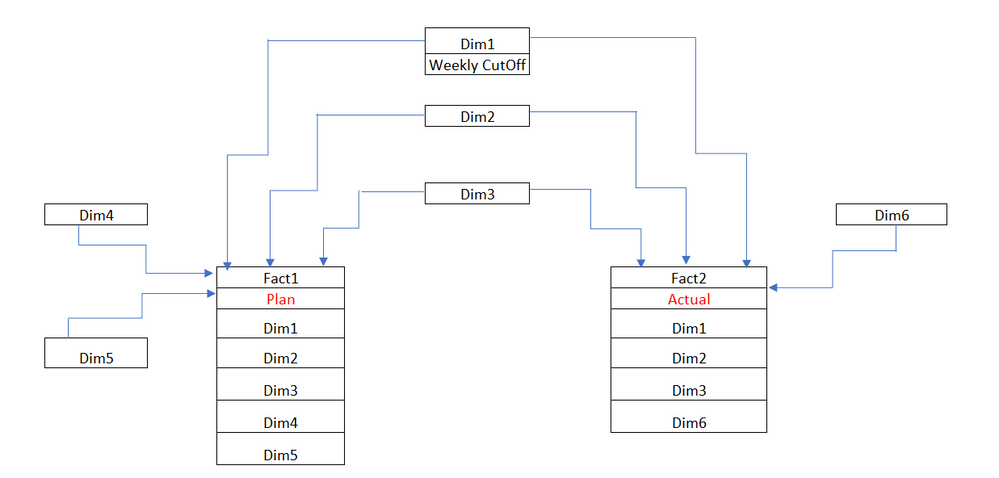
Hello, Can anyone help me with my data model. I'm not sure if my data model is correct or not. I can get correct data if I will use the Dim1, Dim2 Dim3 filter  but unable to get the correct data if my filter is through Dim4, Dim5 and Dim6. How can i relate the 2 Fact Table as these 2 tables having many duplicates. And to get the correct data when accessing either both sides (Dim4, Dim5, Dim6) of the tables using group by and to filter by weekly cutoff of Plan and Actual. Thanks for any help.data model.PNG


1 ACCEPTED SOLUTION
Nathaniel_C
Community Champion
Community Champion

Hi @BlueRocky40 ,


You will have to make sure that you have interim tables for filtering because typically your fact tables will have differing granularities. Filters flow downhill from dim tables to fact tables is why your filter are not working as you expect. So Dim 4 and 5 are fine if you are filtering "down" to Fact1, but will not flow "up" from Fact1. Dim6 will work fine as a filter for Fact2 as it flows "downhill" to Fact2. So, you are on the right track as you have Dim 1, 2, and 3 that flow "down" to both.


If this solves your issues, please mark it as the solution, so that others can find it easily. Kudos are nice too.
Nathaniel


Did I answer your question? Mark my post as a solution!

Proud to be a Super User!


View solution in original post

2 REPLIES 2
Nathaniel_C
Community Champion
Community Champion

Hi @BlueRocky40 ,


You will have to make sure that you have interim tables for filtering because typically your fact tables will have differing granularities. Filters flow downhill from dim tables to fact tables is why your filter are not working as you expect. So Dim 4 and 5 are fine if you are filtering "down" to Fact1, but will not flow "up" from Fact1. Dim6 will work fine as a filter for Fact2 as it flows "downhill" to Fact2. So, you are on the right track as you have Dim 1, 2, and 3 that flow "down" to both.


If this solves your issues, please mark it as the solution, so that others can find it easily. Kudos are nice too.
Nathaniel


Did I answer your question? Mark my post as a solution!

Proud to be a Super User!


Hi @Nathaniel_C thanks for the responses, I got the correct model now. You are right to create interim table and to remove all the duplicates and link with one side of the table is cross filtering. Thanks.

Helpful resources

Announcements
Power BI DataViz World Championships

Power BI Dataviz World Championships

The Power BI Data Visualization World Championships is back! Get ahead of the game and start preparing now!

December 2025 Power BI Update Carousel

Power BI Monthly Update - December 2025

Check out the December 2025 Power BI Holiday Recap!

FabCon Atlanta 2026 carousel

FabCon Atlanta 2026

Join us at FabCon Atlanta, March 16-20, for the ultimate Fabric, Power BI, AI and SQL community-led event. Save $200 with code FABCOMM.