cancel
Showing results for 
Search instead for 
Did you mean: 

Next up in the FabCon + SQLCon recap series: The roadmap for Microsoft SQL and Maximizing Developer experiences in Fabric. All sessions are available on-demand after the live show. Register now

Reply
micds
New Member

Data is blank in PBI Desktop while Data is showing in Power Query

Hi,


My data is showing in Power Query but when loading data to desktop, it's blank.


Not too sure what to do or check. (been using PowerBI for 2 years now, never had this issue). I checked all datatypes of my merges (if this was an issue the data in PowerQuery would be blank too I guess), .. any other ideas?


Thanks guys! Printscreens below.

M.


See printscreens below..

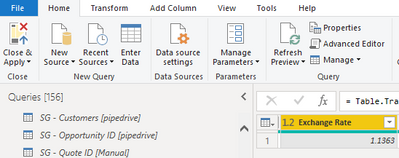
Power Query - Column "Exchange Rate" has data"

micds_0-1641401254046.png

After loading data to Desktop, no data is shown

micds_1-1641401319524.png


3 REPLIES 3
Anonymous
Not applicable

Hi @micds ,

Whether your problem has been resolved? If yes, could you please mark the helpful post as Answered? It will help the others in the community find the solution easily if they face the same problem with you. Thank you.

Best Regards

Anonymous
Not applicable

Hi @micds ,

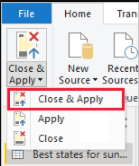
First, please make sure you have applied the changes in Power Query Editor and load them into Power BI Desktop by selecting Close & Apply from the Home tab of the ribbon.

yingyinr_2-1641801485836.png

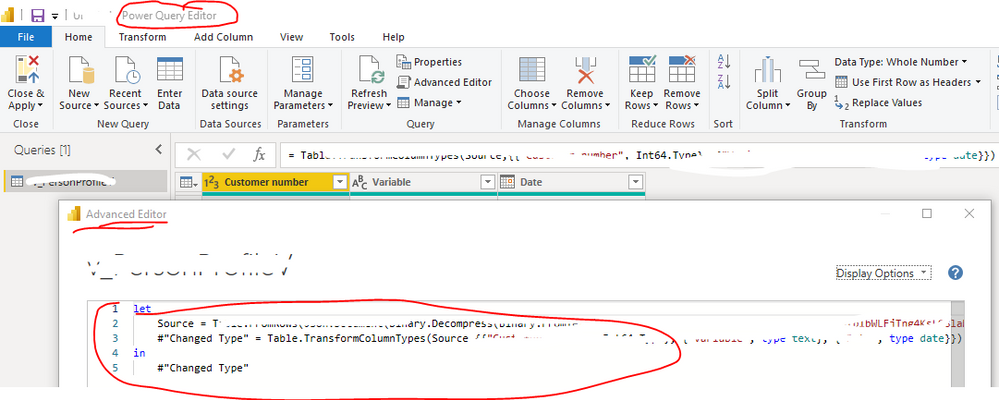
After that, it seems there are 156 queries from the screenshot you provided. Which query (table) is having this problem? Could you please share the applied codes in in the Advanced Editor for the corresponding query? Later, we will make troubleshooting to check if a certain step was applied to cause such a problem.

yingyinr_0-1641800845143.png

Advanced EditorAdvanced Editor

In addition, please check the following links with similar problems to yours. Hopefully the solutions there will also help you solve your problem. Thank you.

Data loads in Power Query but not in Power BI

Data Not Showing Up

Power BI Modelling Error

Best Regards

It seems to be a relationship problem. Are you using columns from different tables in your visual on desktop? If yes, check the relationship between these tables. Try to change the relationship type and/or filter direction.

Helpful resources

Announcements
New to Fabric survey Carousel

New to Fabric Survey

If you have recently started exploring Fabric, we'd love to hear how it's going. Your feedback can help with product improvements.

Power BI DataViz World Championships carousel

Power BI DataViz World Championships - June 2026

A new Power BI DataViz World Championship is coming this June! Don't miss out on submitting your entry.

Join our Fabric User Panel

Join our Fabric User Panel

Share feedback directly with Fabric product managers, participate in targeted research studies and influence the Fabric roadmap.

March Power BI Update Carousel

Power BI Community Update - March 2026

Check out the March 2026 Power BI update to learn about new features.