cancel
Showing results for 
Search instead for 
Did you mean: 

Try your skills in the Power BI Dataviz World Championship! Round one ends June 26. Join now

Reply
DanCasSan
Helper V
Helper V

Data entry fields

Hello community:


I have a question, can a field be enabled in a published report of Power BI for the user to enter data and this is used as a variable?


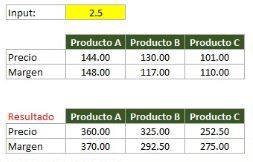
Let's say that, I have the price and the margin with certain fixed values ​​and these must be operated with the data that the user enters, just as shown in the attached image (the price and margin values ​​are multiplied with the Input field). It should be noted that this data is unique, so when a new data is entered, everything previously entered must be deleted.
 

DownloadCalculate.JPG


I will appreciate your advice or guidance on how I could do this.


Thank you!

Best regards,

1 ACCEPTED SOLUTION
MFelix
Super User
Super User

Hi @DanCasSan,


You should use a Whatifanalys that allows you to have a parameter for user input, be aware that this is a table with the values you define so it can be from 1 to 100 having values from 5 to 5 (20 rows) or another setting like 0 to 1 with increments of 0.01 this will give you 100 rows.


Then just use the measure created automatically to get the calculation for example look at the PBIX file attach and the documentation on what if analysis.

https://docs.microsoft.com/en-us/power-bi/desktop-what-if


In my example I made a table from 0 to 5 with  increase of 0.5 so you can go above the price or below the price. you can also set negative values on the parameter.


Regards

Miguel Félix


Did I answer your question? Mark my post as a solution!

Proud to be a Super User!

Check out my blog: Power BI em Português


View solution in original post

1 REPLY 1
MFelix
Super User
Super User

Hi @DanCasSan,


You should use a Whatifanalys that allows you to have a parameter for user input, be aware that this is a table with the values you define so it can be from 1 to 100 having values from 5 to 5 (20 rows) or another setting like 0 to 1 with increments of 0.01 this will give you 100 rows.


Then just use the measure created automatically to get the calculation for example look at the PBIX file attach and the documentation on what if analysis.

https://docs.microsoft.com/en-us/power-bi/desktop-what-if


In my example I made a table from 0 to 5 with  increase of 0.5 so you can go above the price or below the price. you can also set negative values on the parameter.


Regards

Miguel Félix


Did I answer your question? Mark my post as a solution!

Proud to be a Super User!

Check out my blog: Power BI em Português


Helpful resources

Announcements
Fabric Data Days is here Carousel

Data Days 2026

Don't miss out on Data Days, June 15 through August 7. Learn Fabric, Power BI, SQL, AI and more.

Power BI DataViz World Championships carousel

Power BI DataViz World Championships - June 2026

A new Power BI DataViz World Championship is coming this June! Don't miss out on submitting your entry.