Get Fabric or SQL Certified for Free.
Get certified for free when you join Fabric Data Days 2026 and dive into Fabric, Power BI, SQL, AI, and other essential data skills.
Join now- Power BI forums
- Get Help with Power BI
- Desktop
- Service
- Report Server
- Power Query
- Mobile Apps
- Developer
- DAX Commands and Tips
- Custom Visuals Development Discussion
- Health and Life Sciences
- Power BI Spanish forums
- Translated Spanish Desktop
- Training and Consulting
- Instructor Led Training
- Dashboard in a Day for Women, by Women
- Galleries
- Data Stories Gallery
- Themes Gallery
- Contests Gallery
- QuickViz Gallery
- Quick Measures Gallery
- Visual Calculations Gallery
- Notebook Gallery
- Translytical Task Flow Gallery
- TMDL Gallery
- R Script Showcase
- Webinars and Video Gallery
- Ideas
- Custom Visuals Ideas (read-only)
- Issues
- Issues
- Events
- Upcoming Events
Try your skills in the Power BI Dataviz World Championship! Round one ends June 26. Join now
- Power BI forums
- Forums
- Get Help with Power BI
- Desktop
- Re: Data Tree R Code working in Rstudio but not in...
- Subscribe to RSS Feed
- Mark Topic as New
- Mark Topic as Read
- Float this Topic for Current User
- Bookmark
- Subscribe
- Printer Friendly Page

- Mark as New
- Bookmark
- Subscribe
- Mute
- Subscribe to RSS Feed
- Permalink
- Report Inappropriate Content
Data Tree R Code working in Rstudio but not in PowerBI..Please help
hello all,
I am trying to create a R visual in powerbi.
R code which is working fine in Rstudio is
Data <- read_excel(path = "D:\\Book1.xlsx",sheet = "Sheet4")

Data$pathString <- paste("name",
                         Data$Level1,
                         Data$Level2,
                         Data$Level3,
                         Data$Level4,
                         Data$Level5,
                         Data$Level6,
                         sep = "/")


library(data.tree)
Network <- as.Node(Data)

plot(Network)
and it is giving me output a visual as below image
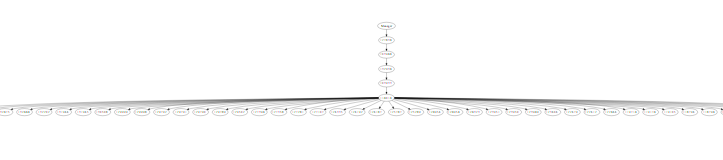
But when i try the same code in powerbi it is not working.
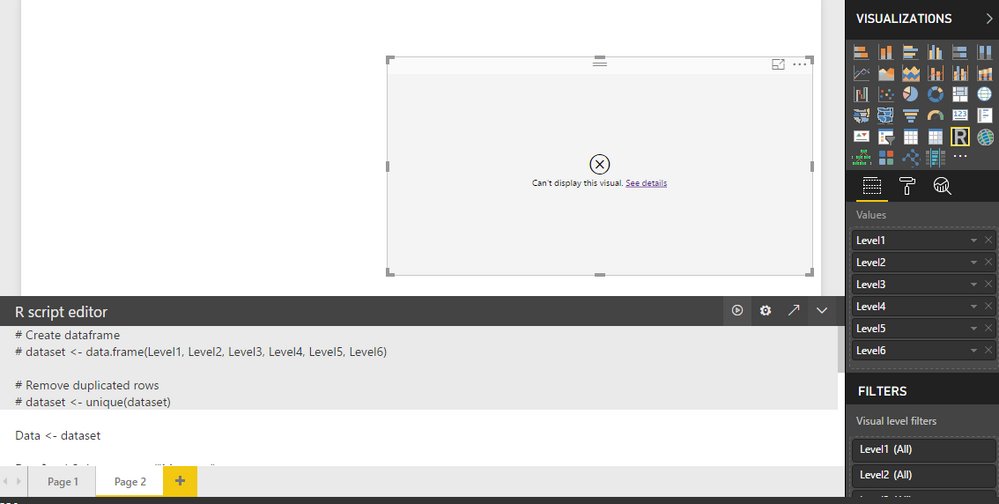
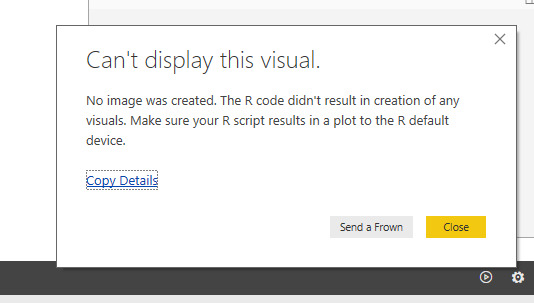
But when i clicked EDIT IN EXTERNEL R IDE it worked perfectly.
This is for the first time that im trying to create R visuals in powerbi.
Can anyone please suggest me about this.
Solved! Go to Solution.
- Mark as New
- Bookmark
- Subscribe
- Mute
- Subscribe to RSS Feed
- Permalink
- Report Inappropriate Content
I got it to work. Here's an example of how to get it to render:
library(DiagrammeR)
library(DiagrammeRsvg)
library(magrittr)
library(svglite)
library(rsvg)
library(png)
library(data.tree)

Type <- c('Car','Car','Car','Car')
Manufacturer <- c('Chevrolet', 'Chevrolet', 'Honda', 'Toyota')
Model <- c('Impala', 'Silverado', 'CR-V', 'Camery')

dataset<- data.frame(Type, Manufacturer, Model, stringsAsFactors=FALSE)

dataset$pathString <- paste(dataset$Type, dataset$Manufacturer, dataset$Model,sep = "/")
tree <- as.Node(dataset)

export_svg(plot(tree))%>%charToRaw %>% rsvg %>% png::writePNG('001.png')
The last part is how you export it manually to a .png, which power BI seems to be looking for.

- Mark as New
- Bookmark
- Subscribe
- Mute
- Subscribe to RSS Feed
- Permalink
- Report Inappropriate Content
I got it to work. Here's an example of how to get it to render:
library(DiagrammeR)
library(DiagrammeRsvg)
library(magrittr)
library(svglite)
library(rsvg)
library(png)
library(data.tree)

Type <- c('Car','Car','Car','Car')
Manufacturer <- c('Chevrolet', 'Chevrolet', 'Honda', 'Toyota')
Model <- c('Impala', 'Silverado', 'CR-V', 'Camery')

dataset<- data.frame(Type, Manufacturer, Model, stringsAsFactors=FALSE)

dataset$pathString <- paste(dataset$Type, dataset$Manufacturer, dataset$Model,sep = "/")
tree <- as.Node(dataset)

export_svg(plot(tree))%>%charToRaw %>% rsvg %>% png::writePNG('001.png')
The last part is how you export it manually to a .png, which power BI seems to be looking for.
- Mark as New
- Bookmark
- Subscribe
- Mute
- Subscribe to RSS Feed
- Permalink
- Report Inappropriate Content
Hi, thanks to the workaround provided.
We use it and managed partialy to resolve the visualization problem.
However, once report is published into Power BI Service it throws an error that not all libraries used in a visual are supported.
Have you faced the same problem?
Any ideas how it can be resolved?
Thanks!
- Mark as New
- Bookmark
- Subscribe
- Mute
- Subscribe to RSS Feed
- Permalink
- Report Inappropriate Content
I am having the exact same problem. Downloaded and installed the older version (0.7.0) of data.tree. Still does not work. Works fine in R studio.
This would be extremely helpful in a project I'm working on, but I'm about ready to give up...


- Mark as New
- Bookmark
- Subscribe
- Mute
- Subscribe to RSS Feed
- Permalink
- Report Inappropriate Content
@Anonymous,
You may check Requirements and Limitations of R packages.
If this post helps, then please consider Accept it as the solution to help the other members find it more quickly.
- Mark as New
- Bookmark
- Subscribe
- Mute
- Subscribe to RSS Feed
- Permalink
- Report Inappropriate Content
@v-chuncz-msft thanks for the reply.
I jus checekd the link that you have provided.
I dont see any limitations for the Data tree package..
and i dont see any perticular limitations which the funtions and packages that i have used
Helpful resources

Fabric Data Days 2026
Don't miss out on Data Days, June 15 through August 7. Learn Fabric, Power BI, SQL, AI and more.

Power BI DataViz World Championships - June 2026
A new Power BI DataViz World Championship is coming this June! Don't miss out on submitting your entry.

| User | Count |
|---|---|
| 23 | |
| 19 | |
| 18 | |
| 17 | |
| 11 |


| User | Count |
|---|---|
| 54 | |
| 53 | |
| 42 | |
| 38 | |
| 32 |


