This is best Fabric, Power BI, SQL and AI community event. How do we know? The last event sold out! Save €200 with code FABCMTY200.
Register nowA new Data Days event is coming soon! This time we’re going bigger than ever. Fabric, Power BI, SQL, AI and more. Don't miss out.
I connected my Power BI to a database. When i restart the power bi, i cannot find the database i connected with but i can see it in the data source management. how can i reactivate/reconnect to it? Thank you
hi, @Anonymous
When i restart the power bi, i cannot find the database i connected with but i can see it in the data source management.
Do you save the pbix file when you restart the power bi?
1. You may click Home ->Recent Sources
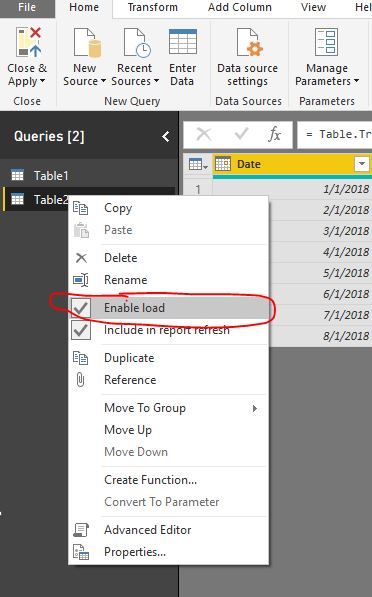
2.Check If you turn off the Enable load Function in Edit Queries
Best Regards,
Lin
Hi Lin,
Thank you for replying. Unfortunately I can't see it also in the recent connections. however i can see it in the data source settings under the global permission.
hi, @Anonymous
however i can see it in the data source settings under the global permission.
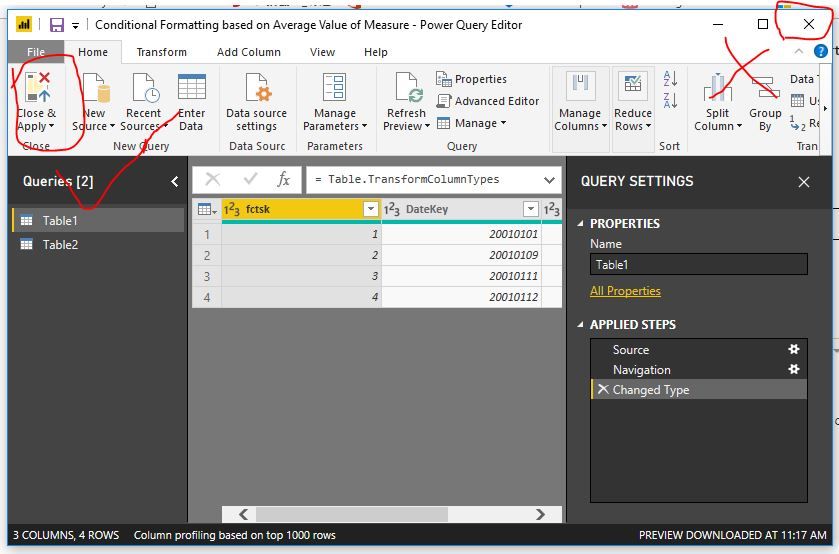
It means that you are Edit Queries, after you end "shape data" in Edit Queries, do not click Close the icon in the upper right corner, Please click Home->Close&Apply
Best Regards,
Lin
Sign up to receive a private message when registration opens and key events begin.
If you have recently started exploring Fabric, we'd love to hear how it's going. Your feedback can help with product improvements.
| User | Count |
|---|---|
| 32 | |
| 26 | |
| 23 | |
| 20 | |
| 15 |
| User | Count |
|---|---|
| 65 | |
| 41 | |
| 28 | |
| 22 | |
| 22 |