Join us at FabCon Atlanta from March 16 - 20, 2026, for the ultimate Fabric, Power BI, AI and SQL community-led event. Save $200 with code FABCOMM.
Register now!The Power BI Data Visualization World Championships is back! Get ahead of the game and start preparing now! Learn more
I connected my Power BI to a database. When i restart the power bi, i cannot find the database i connected with but i can see it in the data source management. how can i reactivate/reconnect to it? Thank you
hi, @Anonymous
When i restart the power bi, i cannot find the database i connected with but i can see it in the data source management.
Do you save the pbix file when you restart the power bi?
1. You may click Home ->Recent Sources
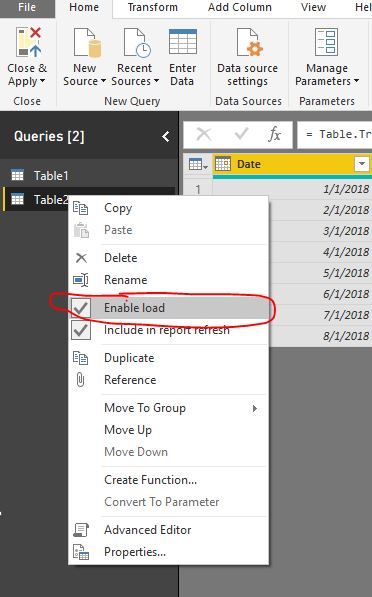
2.Check If you turn off the Enable load Function in Edit Queries
Best Regards,
Lin
Hi Lin,
Thank you for replying. Unfortunately I can't see it also in the recent connections. however i can see it in the data source settings under the global permission.
hi, @Anonymous
however i can see it in the data source settings under the global permission.
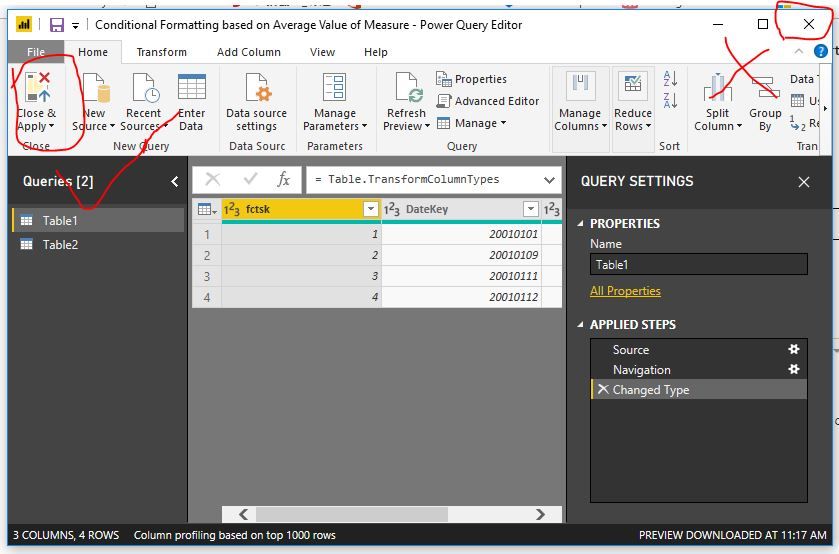
It means that you are Edit Queries, after you end "shape data" in Edit Queries, do not click Close the icon in the upper right corner, Please click Home->Close&Apply
Best Regards,
Lin
The Power BI Data Visualization World Championships is back! Get ahead of the game and start preparing now!
| User | Count |
|---|---|
| 39 | |
| 39 | |
| 37 | |
| 29 | |
| 24 |
| User | Count |
|---|---|
| 120 | |
| 95 | |
| 70 | |
| 69 | |
| 65 |