Get certified for free when you join Fabric Data Days 2026 and dive into Fabric, Power BI, SQL, AI, and other essential data skills.
Join nowData Days is here! Join us now for 60+ days of learning, challenges, and connection. Learn more
Hello All,
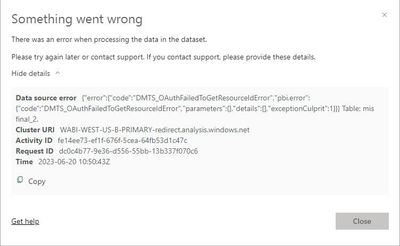
I have connected my on premises gateway in my Power BI Desktop but i could not get it connected to my datasource
Have attached the screenshot for your reference
Solutions will be appreciated
TIA
Hi @Sairam_11 ,
According to the error message, this is caused by a validation error in your data source connection information, please use the correct credentials.
Best regards,
Community Support Team_Binbin Yu
If this post helps, then please consider Accept it as the solution to help the other members find it more quickly.
Hi,
The data is getting refreshed when in a manual mode. This error pops up when this is kept in Scheduled Refresh. Is there any idea to get it solved?
Hello, I ve been having a similar problem since I activated 2FA.
To solve it I went to the data configuration on powerbi bi service and added a new data origin to the gateway. I hope it solves the problem for you too.
Don't miss out on Data Days, June 15 through August 7. Learn Fabric, Power BI, SQL, AI and more.
Check out the May 2026 Power BI update to learn about new features.
| User | Count |
|---|---|
| 22 | |
| 21 | |
| 20 | |
| 17 | |
| 13 |
| User | Count |
|---|---|
| 58 | |
| 50 | |
| 37 | |
| 29 | |
| 24 |