Join us at FabCon Atlanta from March 16 - 20, 2026, for the ultimate Fabric, Power BI, AI and SQL community-led event. Save $200 with code FABCOMM.
Register now!The Power BI Data Visualization World Championships is back! Get ahead of the game and start preparing now! Learn more
Hi Guys,
I have an initial file that i uploaded in power bi desktop. Then I forgot to include something so I update the file. But when I refresh the data, an error came up and it messes my data.
Thanks,
Solved! Go to Solution.
Hi @miguelflores,
Can you please share us some detail information about your issue? For example: error message, operate steps, screenshots...etc...
Regards,
Xiaoxin Sheng
Thanks, I got it already. 🙂
Hi
I have same problem , could you help me with solve?
@Anonymous could you post a screenoshot of the error? What data source is your information coming from?
If this is an excel sheet and you added a new column to it, you will need to update the source in the editor, so PBI can read the file again
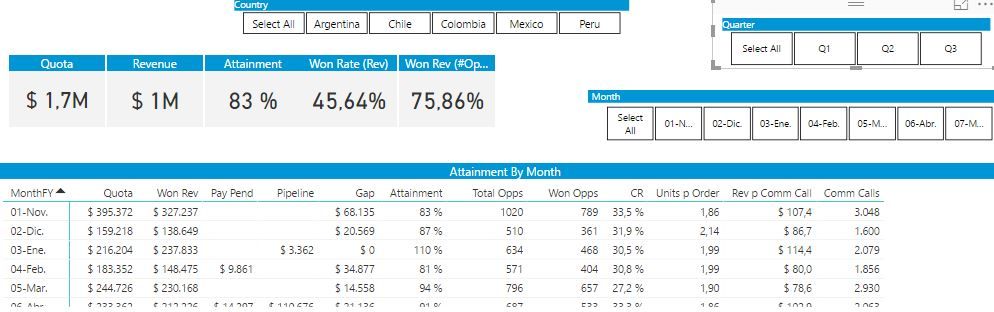
@majdkaid22 First view is my power bi desktop view
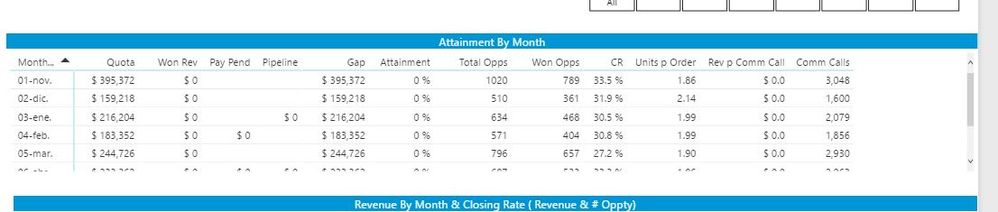
but when I load data and update dataset, Won Rev, pay pend, and pipeline Columns change to 0.
Information in Quota column works properly, and datasource is an excel file.
Won revenue information column manages two sources, excel file and salesforce.com report.
I dowloaded .pbix report from service, but when I open the file and update, it works.
This topic appears as 'solved' but I can't information about how to.
Best !
The Power BI Data Visualization World Championships is back! Get ahead of the game and start preparing now!
| User | Count |
|---|---|
| 40 | |
| 37 | |
| 33 | |
| 29 | |
| 27 |
| User | Count |
|---|---|
| 134 | |
| 104 | |
| 63 | |
| 60 | |
| 55 |