We've captured the moments from FabCon & SQLCon that everyone is talking about, and we are bringing them to the community, live and on-demand. Starts on April 14th. Register now
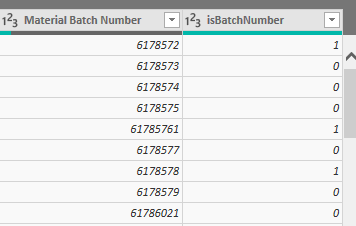
I'm wondering why my binary indicator column is not properly pulling from Excel. In the query preview isBatchNumber is pulling properly.
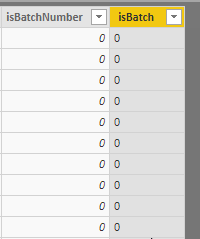
However, after the query executes, it is just full of 0's
Solved! Go to Solution.
I'm an idiot! I just had to sort my data the same in power bi data viewer as was in the Excel Sort.
Have you done any transformations or filtering on the isBatchNumber column? If you could provide us with the full set of commands from the Advanced Editor window, I could help more.
Thank you for the reply Cmcmahan. The line of my query that is doing this
#"Changed Type" = Table.TransformColumnTypes(#"Promoted Headers",{{"Order", Int64.Type}, {"Material", Int64.Type}, {"Column3", type any}, {"Batch", Int64.Type}, {"MRP ctrlr", type text}, {"Order Type", type text}, {"Pr.Superv.", Int64.Type}, {"Act. start", type date}, {"Material Batch Number", Int64.Type}, {"isBatchNumber", Int64.Type}})
If you have recently started exploring Fabric, we'd love to hear how it's going. Your feedback can help with product improvements.
A new Power BI DataViz World Championship is coming this June! Don't miss out on submitting your entry.
Share feedback directly with Fabric product managers, participate in targeted research studies and influence the Fabric roadmap.
| User | Count |
|---|---|
| 53 | |
| 38 | |
| 33 | |
| 17 | |
| 17 |
| User | Count |
|---|---|
| 67 | |
| 62 | |
| 38 | |
| 34 | |
| 22 |