cancel
Showing results for 
Search instead for 
Did you mean: 

The Power BI Data Visualization World Championships is back! It's time to submit your entry. Live now!

Reply
Anonymous
Not applicable

Data Modelling Help

Hi,


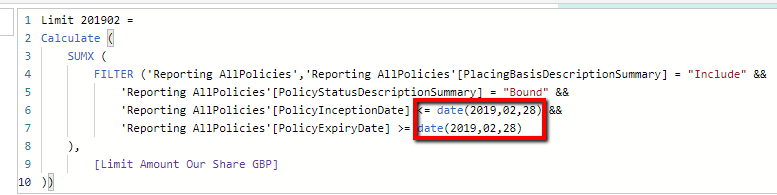
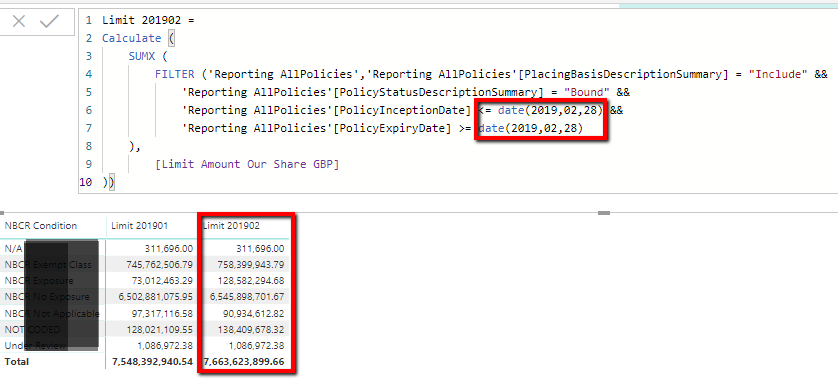
I have a table with a measure "Limit Amount Our Share GBP" that I need to create a matrix report at each month end. I have created new measures based on Feb & Jan 2019 month end, but need to go back to January 2017 and this report will be used for future months as well.


Rather than creating lots of measures for future & past month ends how can I do t by creating another table listing the month end dates???


Below is an example of the measure I've created and the matrix so far, highlighting the measure and date paramenters.


PBI_NBCR.png


Any assistance will be great!


Thanks


Jason

1 ACCEPTED SOLUTION

Hi @Anonymous,

Sorry I miss the bit where you use two different dates.


You can use the pattern below:

First create Table:

Year Month =
VAR CY = YEAR(TODAY())
VAR SY = CY -2
RETURN
ADDCOLUMNS(
CROSSJOIN(
SELECTCOLUMNS(GENERATESERIES(SY, CY), "Year", [Value]),
SELECTCOLUMNS(GENERATESERIES(1, 12), "Month", [Value])
),
"StartDate", DATE([Year], [Month], 1)
)
 
Add two Columns to that Table:
EndDate = EOMONTH('Year Month'[StartDate],0)
Year Month = FORMAT('Year Month'[StartDate], "YYYYMM")
Create Measure:
calc =
CALCULATE(
SUM('Your Table'[Value]),
FILTER(
'Your Table',
'Your Table'[Date] <= MAX('Year Month'[EndDate])
&& 'Your Table'[Date] >= MAX('Year Month'[StartDate])
)
)

Hope this helps 
Mariusz

View solution in original post

3 REPLIES 3
Mariusz
Community Champion
Community Champion

Hi @Anonymous,

You can use calendar table (dimension) with Year Month Column that goes to your Matrix column and just use your Measure without a need for complex dax.

Hope this helps
Mariusz


Anonymous
Not applicable

Hi @Mariusz 


Thanks for you assistance once more.

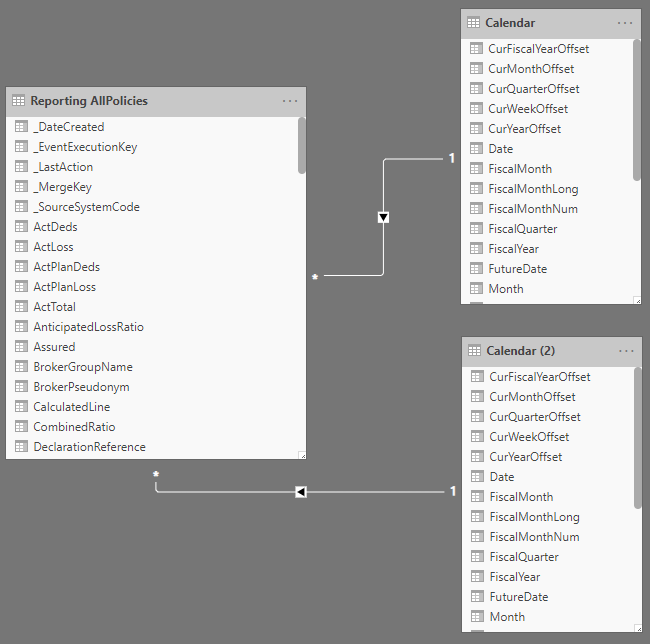
I have added the calendar table to my model, however I have two date field parameters that I use to calculate the measure <= "PolicyIncpetionDate" & >= "PolicyExpiryDate".


PBI_NBCR-2.png


I thought about adding the Calendar table twice and have two joins, both on the "Date" but then one to each of the date fields mentioned above.

PBI_NBCR-3.png


But thats where I'm stuck! How do I calculate the measure automatically for the two paramenters based on the MonthYearNum on the Calendar table????


Hi @Anonymous,

Sorry I miss the bit where you use two different dates.


You can use the pattern below:

First create Table:

Year Month =
VAR CY = YEAR(TODAY())
VAR SY = CY -2
RETURN
ADDCOLUMNS(
CROSSJOIN(
SELECTCOLUMNS(GENERATESERIES(SY, CY), "Year", [Value]),
SELECTCOLUMNS(GENERATESERIES(1, 12), "Month", [Value])
),
"StartDate", DATE([Year], [Month], 1)
)
 
Add two Columns to that Table:
EndDate = EOMONTH('Year Month'[StartDate],0)
Year Month = FORMAT('Year Month'[StartDate], "YYYYMM")
Create Measure:
calc =
CALCULATE(
SUM('Your Table'[Value]),
FILTER(
'Your Table',
'Your Table'[Date] <= MAX('Year Month'[EndDate])
&& 'Your Table'[Date] >= MAX('Year Month'[StartDate])
)
)

Hope this helps 
Mariusz
Helpful resources

Announcements
Power BI DataViz World Championships

Power BI Dataviz World Championships

The Power BI Data Visualization World Championships is back! It's time to submit your entry.

December 2025 Power BI Update Carousel

Power BI Monthly Update - December 2025

Check out the December 2025 Power BI Holiday Recap!

FabCon Atlanta 2026 carousel

FabCon Atlanta 2026

Join us at FabCon Atlanta, March 16-20, for the ultimate Fabric, Power BI, AI and SQL community-led event. Save $200 with code FABCOMM.