
This is best Fabric, Power BI, SQL and AI community event. How do we know? The last event sold out! Save €200 with code FABCMTY200.
Register nowA new Data Days event is coming soon! This time we’re going bigger than ever. Fabric, Power BI, SQL, AI and more. Don't miss out.
Hi,
I have a table of names and their corresponding categories. Some names have multiple categories and some only have one. They are separated by a comma:
I am trying to have one slicer that filters by category so that when "Football" is selected, Jim and Ned come up. I want the slicer to only have "Football", "Basketball", "Baseball", etc. as options and not "Football,Basketball,Baseball".
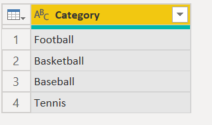
I've split the Category column up by the comma delimeter and also created a category dimension table (see below).
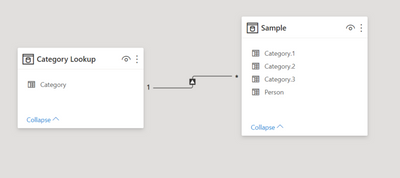
Now I'm not sure what to do as this is what my model looks like, and the slicer only filters the Category.1 column.
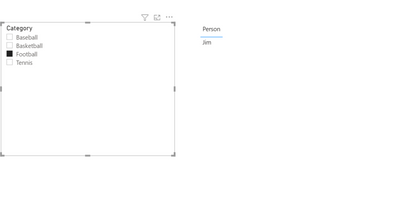
As you can see, in my current dashboard when "Football" is selected, only Jim comes up, not Ned because "Football" is his Category.3.
Sample Dashboard: https://www.dropbox.com/s/wcz65qs5iyahwk1/Multiple%20Category%20-%20One%20Slicer.pbix?dl=0
Thank you in advance!
Solved! Go to Solution.
Hi @Anonymous ,
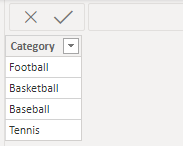
Create the Category table like this by spliting columns and removing replicated values, do not create relationships between this table and the source table.
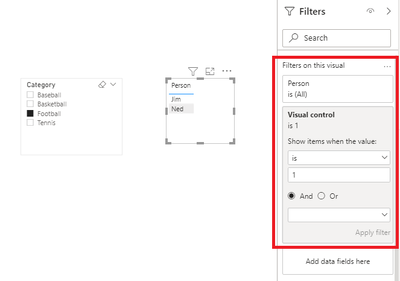
Create a measure like this, put it in the table visual filter and set its value as 1:
Visual control =
IF (
CONTAINSSTRINGEXACT (
SELECTEDVALUE ( 'Table'[Category] ),
SELECTEDVALUE ( Category[Category] )
),
1,
0
)
Attached a sample file in the below, hopes to help you.
Best Regards,
Community Support Team _ Yingjie Li
If this post helps, then please consider Accept it as the solution to help the other members find it more quickly.
Hi @Anonymous ,
Create the Category table like this by spliting columns and removing replicated values, do not create relationships between this table and the source table.
Create a measure like this, put it in the table visual filter and set its value as 1:
Visual control =
IF (
CONTAINSSTRINGEXACT (
SELECTEDVALUE ( 'Table'[Category] ),
SELECTEDVALUE ( Category[Category] )
),
1,
0
)
Attached a sample file in the below, hopes to help you.
Best Regards,
Community Support Team _ Yingjie Li
If this post helps, then please consider Accept it as the solution to help the other members find it more quickly.
Unpivot the Non-Person columns and you'll get one column with all the sports in.
Relate this to the category slicer.
Good luck
Sign up to receive a private message when registration opens and key events begin.
If you have recently started exploring Fabric, we'd love to hear how it's going. Your feedback can help with product improvements.
| User | Count |
|---|---|
| 32 | |
| 26 | |
| 23 | |
| 20 | |
| 15 |
| User | Count |
|---|---|
| 64 | |
| 41 | |
| 28 | |
| 22 | |
| 22 |