cancel
Showing results for 
Search instead for 
Did you mean: 

The Power BI Data Visualization World Championships is back! Get ahead of the game and start preparing now! Learn more

Reply
Anonymous
Not applicable

Data Model

Hi


Data Model; fact and dimesnion tables, best approach best practice.


My datsource is a combination of SAP BI Suit, Excel and SQL views, which tend to come with a good number of columns.  More like a large mass of rows and columns; I say a mass of data but in the scheme of thinngs its not many rows 27k for example.   What I am trying to do is break this down into smaller manageable chunks or tables.  I am trying to identify what parts of my data can be tuned into either FACT or DIMENSION; is this the correct approach to take or do people just work off a flat file and thats it?


For example, what I mean is,  I would extract all the Supplier details from my datasourse and then turn this into a seperate table called SupplierDetails, also creating a relation using the SupplierID.  Again from the same table, I would extract all the Manager names and roles, again turn this in to a seperate table ussign a ManagerID.  My aim is then to link or create a realtionships amongst these tables to make the data more manageable.


Is this the wrong approach?


Any advice or links welcome.


Thanks again

Chris


1 ACCEPTED SOLUTION
Anonymous
Not applicable

It is the perfect approach. I know it can be hard to determain Fact and Dim, struggled with it just a week ago. But yes, star scheme's work the best in PBI.

Also dont forget a date table (dim) 😉

EDIT:
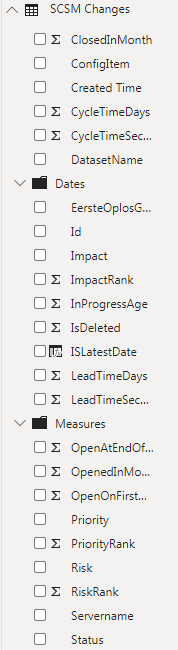
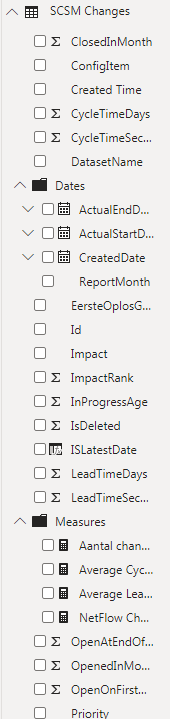
Besides that, if you really have alot of columns you can manage them and put them in maps. I allways do that with measure and dates and that cleans up alot. example:
Knipsel.PNG Knipsel2.PNG

View solution in original post

2 REPLIES 2
Anonymous
Not applicable

It is the perfect approach. I know it can be hard to determain Fact and Dim, struggled with it just a week ago. But yes, star scheme's work the best in PBI.

Also dont forget a date table (dim) 😉

EDIT:
Besides that, if you really have alot of columns you can manage them and put them in maps. I allways do that with measure and dates and that cleans up alot. example:
Knipsel.PNG Knipsel2.PNG

Anonymous
Not applicable

Many thanks for your help.

Helpful resources

Announcements
Power BI DataViz World Championships

Power BI Dataviz World Championships

The Power BI Data Visualization World Championships is back! Get ahead of the game and start preparing now!

November Power BI Update Carousel

Power BI Monthly Update - November 2025

Check out the November 2025 Power BI update to learn about new features.

FabCon Atlanta 2026 carousel

FabCon Atlanta 2026

Join us at FabCon Atlanta, March 16-20, for the ultimate Fabric, Power BI, AI and SQL community-led event. Save $200 with code FABCOMM.