cancel
Showing results for 
Search instead for 
Did you mean: 

The Power BI Data Visualization World Championships is back! Get ahead of the game and start preparing now! Learn more

Reply
Anonymous
Not applicable

Data Model

Hello Everyone,

I am working on my first Power BI project and need some help. I am converting a reporting from Tableau to Power BI. In on the datasources in tableau a custom sql is used and in other datasources tables from data warehouse was used. Can i model the data in powerbi between tables and custom sql(direct query)or i would need to use the tables that make up the query.


Thanks.

1 ACCEPTED SOLUTION

just add a new source as you did in tableau, do the same in power bi.  yes its completely possible  I really recommend you go through the basic power bi videos as the question you are asking is a fundamental.  it is good to go through some material to get yourself up to speed, as i did already answer the question so i am not sure what you are asking.  You can add as many sources as you need from  multple sources either the whole table or a statement issued against it.  Just get data -> add source


https://www.youtube.com/watch?v=K690u_FkL4A


If I took the time to answer your question and I came up with a solution, please mark my post as a solution and /or give kudos freely for the effort 🙂 Thank you!

Proud to be a Super User!


View solution in original post

5 REPLIES 5
vanessafvg
Super User
Super User

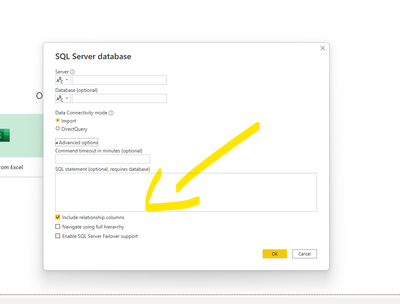
this is where you put the custom statement


vanessafvg_0-1655408964603.png


If I took the time to answer your question and I came up with a solution, please mark my post as a solution and /or give kudos freely for the effort 🙂 Thank you!

Proud to be a Super User!


Anonymous
Not applicable

Hello,

Thanks for the feedback. My question is that in the tableau report, one datasource came from a sql statement. and other datasources were direct tables. How can I buid a model out of direct tables and sql statements in power bi? I hope that is clear please.

just add a new source as you did in tableau, do the same in power bi.  yes its completely possible  I really recommend you go through the basic power bi videos as the question you are asking is a fundamental.  it is good to go through some material to get yourself up to speed, as i did already answer the question so i am not sure what you are asking.  You can add as many sources as you need from  multple sources either the whole table or a statement issued against it.  Just get data -> add source


https://www.youtube.com/watch?v=K690u_FkL4A


If I took the time to answer your question and I came up with a solution, please mark my post as a solution and /or give kudos freely for the effort 🙂 Thank you!

Proud to be a Super User!


Anonymous
Not applicable

Thanks for your help. 

vanessafvg
Super User
Super User

Imported models tend to be more performant  Not quite sure what you asking, your model can consist of sql tables or a sql statement issued against a database, just click in the advance section of the dialog box when you select your sql server / database.    You can do this in imported or direct query mode.  But imported would be my preference unless you have a lot of data.


If I took the time to answer your question and I came up with a solution, please mark my post as a solution and /or give kudos freely for the effort 🙂 Thank you!

Proud to be a Super User!


Helpful resources

Announcements
Power BI DataViz World Championships

Power BI Dataviz World Championships

The Power BI Data Visualization World Championships is back! Get ahead of the game and start preparing now!

December 2025 Power BI Update Carousel

Power BI Monthly Update - December 2025

Check out the December 2025 Power BI Holiday Recap!

FabCon Atlanta 2026 carousel

FabCon Atlanta 2026

Join us at FabCon Atlanta, March 16-20, for the ultimate Fabric, Power BI, AI and SQL community-led event. Save $200 with code FABCOMM.

Top Solution Authors