Join us at FabCon Atlanta from March 16 - 20, 2026, for the ultimate Fabric, Power BI, AI and SQL community-led event. Save $200 with code FABCOMM.
Register now!Vote for your favorite vizzies from the Power BI Dataviz World Championship submissions. Vote now!
Hi All - I have data model as shown in below screen shots. In model, I have cloned Date Table multipletimes , looking for suggestions on how to remove date table redundancy and possible redesing options.
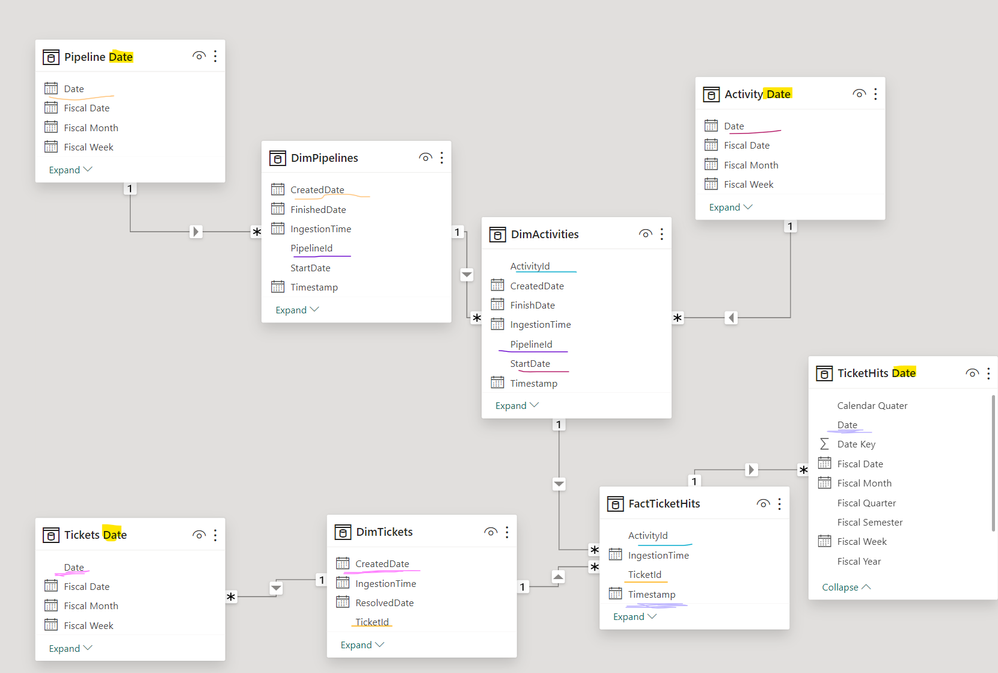
Measures:
DimPipelines ==> Total Pipelines ==> COUNT(PipelineId)
PipelineId is UniqueId
DimActivites ==> Total Activities ==> COUNT(ActivityId)
ActivityId is UniqueId ( It's concatenation of PipelineId + ActivityName ; ActivityId =PipelineID + ActivityName)
FactTicketHits ==> Total Hits ==> SUM(TotalHits)
===> Total Tickets ==> COUNT(TicketId)
ActivityId , IncidentId is Unique ==>Each Activty can trigger multiple tickets)
DimTickets ==> MetaData of TicketId
We need to clone date table toanswer below questions
Dim Pipelines
==> Total Pipelines Started in Month/ Year/ Quarter/ Weekly. ( StartDate)
( ex: I'm unable to use Default Date Hierarchy provided by Power BI because Month just gives month Name but not combination of Month and Year i.e By Dragging StartDate from DimPipeline
==> Total Pipelines Finished in Month/ Year/ Quarter/ Weekly. ( I'll use UserRelationship here) ( FinishedDate)
Dim Activites
==> Total Activites Started in Month/ Year/ Quarter ( StartDate)
==> Total Pipelines Finished in Month/ Year/ Quarter ( I'll use UserRelationship here) ( FinishedDate)
I can't reuse same date tables because it creates circular dependency. Please Provide your suggestions
FactTicketHits
==> TotalHists in Month/ Year/ Quarter
DimTickets
==> Total Incidents Created in Month/ Year/ Quarter/ Weekly (CreatedDate)
==> Total Incidents Resolved in Month/ Year/ Quarter/ Weekly ( I'll use UserRelationship here) ( ResolvedDate)
I can't reuse same date tables because it creates circular dependency. Please Provide your suggestions
DimTickets
Solved! Go to Solution.
I think the model needs reconsideration. For example, if you need a ticket as both fact and Dim, then you should have two copies one a DIm and one as fact
So the model will be Like
Date - dim
Ticket - Dim
Ticket - Fact
Pipeline -> Activity ->Hits -> combine Fact
If need have Pipeline and Activity as Dim
Join Date with Ticket Fact , Combined fact
Ticket with Ticket and combined fact
In this model, you can have an independent table if needed. Attached file - Without join date table for Active, Created, and Resolved (Use same logic as HR). Second with the Joined date table, the same stuff
Power BI: HR Analytics - Employees as on Date : https://youtu.be/e6Y-l_JtCq4
https://community.powerbi.com/t5/Community-Blog/HR-Analytics-Active-Employee-Hire-and-Termination-tr...
Power BI HR Active Employee Tenure Bucketing, and Hired, Terminated, and Active employees: https://youtu.be/fvgcx8QLqZU
I think the model needs reconsideration. For example, if you need a ticket as both fact and Dim, then you should have two copies one a DIm and one as fact
So the model will be Like
Date - dim
Ticket - Dim
Ticket - Fact
Pipeline -> Activity ->Hits -> combine Fact
If need have Pipeline and Activity as Dim
Join Date with Ticket Fact , Combined fact
Ticket with Ticket and combined fact
In this model, you can have an independent table if needed. Attached file - Without join date table for Active, Created, and Resolved (Use same logic as HR). Second with the Joined date table, the same stuff
Power BI: HR Analytics - Employees as on Date : https://youtu.be/e6Y-l_JtCq4
https://community.powerbi.com/t5/Community-Blog/HR-Analytics-Active-Employee-Hire-and-Termination-tr...
Power BI HR Active Employee Tenure Bucketing, and Hired, Terminated, and Active employees: https://youtu.be/fvgcx8QLqZU
Vote for your favorite vizzies from the Power BI World Championship submissions!
If you love stickers, then you will definitely want to check out our Community Sticker Challenge!
Check out the January 2026 Power BI update to learn about new features.
| User | Count |
|---|---|
| 58 | |
| 52 | |
| 40 | |
| 17 | |
| 16 |
| User | Count |
|---|---|
| 111 | |
| 109 | |
| 40 | |
| 33 | |
| 26 |