Join us at FabCon Atlanta from March 16 - 20, 2026, for the ultimate Fabric, Power BI, AI and SQL community-led event. Save $200 with code FABCOMM.
Register now!The Power BI Data Visualization World Championships is back! Get ahead of the game and start preparing now! Learn more
Hi All - I have data model as shown in below screen shots. In model, I have cloned Date Table multipletimes , looking for suggestions on how to remove date table redundancy and possible redesing options.
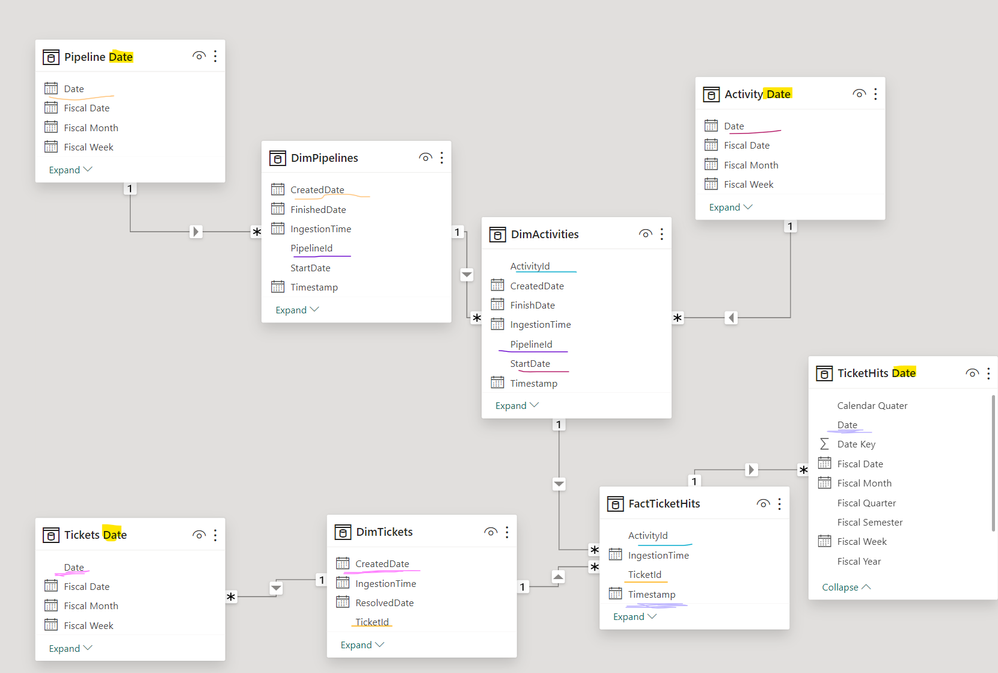
Measures:
DimPipelines ==> Total Pipelines ==> COUNT(PipelineId)
PipelineId is UniqueId
DimActivites ==> Total Activities ==> COUNT(ActivityId)
ActivityId is UniqueId ( It's concatenation of PipelineId + ActivityName ; ActivityId =PipelineID + ActivityName)
FactTicketHits ==> Total Hits ==> SUM(TotalHits)
===> Total Tickets ==> COUNT(TicketId)
ActivityId , IncidentId is Unique ==>Each Activty can trigger multiple tickets)
DimTickets ==> MetaData of TicketId
We need to clone date table toanswer below questions
Dim Pipelines
==> Total Pipelines Started in Month/ Year/ Quarter/ Weekly. ( StartDate)
( ex: I'm unable to use Default Date Hierarchy provided by Power BI because Month just gives month Name but not combination of Month and Year i.e By Dragging StartDate from DimPipeline
==> Total Pipelines Finished in Month/ Year/ Quarter/ Weekly. ( I'll use UserRelationship here) ( FinishedDate)
Dim Activites
==> Total Activites Started in Month/ Year/ Quarter ( StartDate)
==> Total Pipelines Finished in Month/ Year/ Quarter ( I'll use UserRelationship here) ( FinishedDate)
I can't reuse same date tables because it creates circular dependency. Please Provide your suggestions
FactTicketHits
==> TotalHists in Month/ Year/ Quarter
DimTickets
==> Total Incidents Created in Month/ Year/ Quarter/ Weekly (CreatedDate)
==> Total Incidents Resolved in Month/ Year/ Quarter/ Weekly ( I'll use UserRelationship here) ( ResolvedDate)
I can't reuse same date tables because it creates circular dependency. Please Provide your suggestions
DimTickets
Solved! Go to Solution.
I think the model needs reconsideration. For example, if you need a ticket as both fact and Dim, then you should have two copies one a DIm and one as fact
So the model will be Like
Date - dim
Ticket - Dim
Ticket - Fact
Pipeline -> Activity ->Hits -> combine Fact
If need have Pipeline and Activity as Dim
Join Date with Ticket Fact , Combined fact
Ticket with Ticket and combined fact
In this model, you can have an independent table if needed. Attached file - Without join date table for Active, Created, and Resolved (Use same logic as HR). Second with the Joined date table, the same stuff
Power BI: HR Analytics - Employees as on Date : https://youtu.be/e6Y-l_JtCq4
https://community.powerbi.com/t5/Community-Blog/HR-Analytics-Active-Employee-Hire-and-Termination-tr...
Power BI HR Active Employee Tenure Bucketing, and Hired, Terminated, and Active employees: https://youtu.be/fvgcx8QLqZU
I think the model needs reconsideration. For example, if you need a ticket as both fact and Dim, then you should have two copies one a DIm and one as fact
So the model will be Like
Date - dim
Ticket - Dim
Ticket - Fact
Pipeline -> Activity ->Hits -> combine Fact
If need have Pipeline and Activity as Dim
Join Date with Ticket Fact , Combined fact
Ticket with Ticket and combined fact
In this model, you can have an independent table if needed. Attached file - Without join date table for Active, Created, and Resolved (Use same logic as HR). Second with the Joined date table, the same stuff
Power BI: HR Analytics - Employees as on Date : https://youtu.be/e6Y-l_JtCq4
https://community.powerbi.com/t5/Community-Blog/HR-Analytics-Active-Employee-Hire-and-Termination-tr...
Power BI HR Active Employee Tenure Bucketing, and Hired, Terminated, and Active employees: https://youtu.be/fvgcx8QLqZU
The Power BI Data Visualization World Championships is back! Get ahead of the game and start preparing now!
| User | Count |
|---|---|
| 39 | |
| 35 | |
| 33 | |
| 32 | |
| 28 |
| User | Count |
|---|---|
| 136 | |
| 96 | |
| 77 | |
| 67 | |
| 65 |