
cancel
Showing results for 
Search instead for 
Did you mean: 

We've captured the moments from FabCon & SQLCon that everyone is talking about, and we are bringing them to the community, live and on-demand. Starts on April 14th. Register now

Reply
raymond
Post Patron
Post Patron

Data Model Cross-Filtering between 2+ Tables

Hello everyone,


I guess it is a seemingly simple problem but I dont know how to do it. There are 3 tables that I want to cross-filter. At the end I want to set a filter on which I can select e.g. (1) "Channel » Google_1" and get the number of Events from the Conversion Table that contribute to that. In another case I want to set a filter with (2) "Conversion » Download" and get the number of clicks and impressions. 


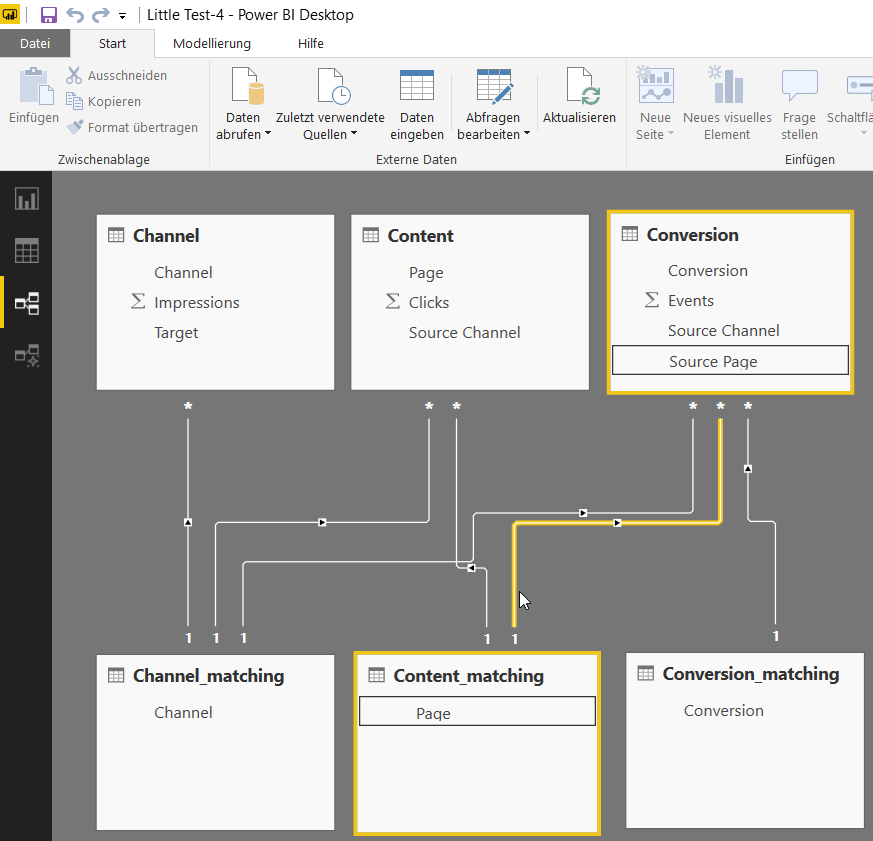
My first approach to solve that was to use the 4th table as some kind of a matching table. This however only worked for (1) but not for the reverse filter setting (2). 


Does anyone have a clou? 


A sample PBI file can be found here: Sample File


A Channel Table 

ChannelImpressionsTarget
Google_11000Produkt
Google_250Start
Xing_12000Produkt
Xing_2250Start


A Content Table

PageClicksSource Channel
Produkt100Google_1
Start5Google_2
Produkt200Xing_1
Start2Xing_2


A Conversion Table 

ConversionEventsSource ChannelSource Page
Download5Google_1Produkt
Download1Google_2Start
Download10Xing_1Produkt
Download1Xing_2Start
Contact5Google_1Produkt
Contact0Google_2Start
Contact10Xing_1Produkt
Contact0Xing_2Start


2 REPLIES 2
Anonymous
Not applicable

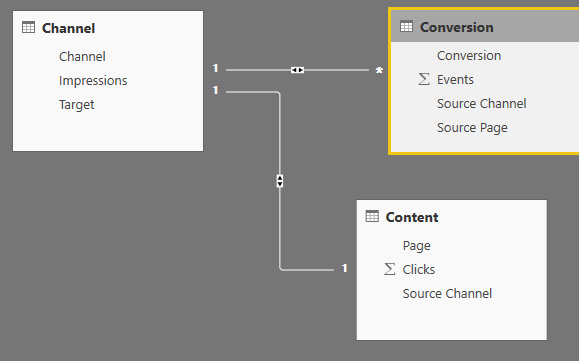
You should be able to keep just the three source tables, and then make a relation from the channel table to the other two tables. And that is more or less it, if this solves the problem mark it as solved.

Channel.PNG

Thanks for your help. Unfortunately it doesnt resolve the isse.

1. There is a warning due to the many to many relationship which I would like to avoid.

2. When I filter by Channel (e.g. Google_1) the associated clicks and events dont get filtered automatically and vice versa.


I was thinking of including matching tables but this doesnt work right as well. It does however show me the right values when I start from the channel table. The further I go, the more inconclusive the values gonne get. The Content table only shows two columns correct. The Conversion table only shows conversions correct. 


2018-11-30 09_15_27-Little Test-4 - Power BI Desktop.png2018-11-30 09_15_50-Little Test-4 - Power BI Desktop.png2018-11-30 09_16_34-Little Test-4 - Power BI Desktop.png2018-11-30 09_18_28-Little Test-4 - Power BI Desktop.png

Helpful resources

Announcements
New to Fabric survey Carousel

New to Fabric Survey

If you have recently started exploring Fabric, we'd love to hear how it's going. Your feedback can help with product improvements.

Power BI DataViz World Championships carousel

Power BI DataViz World Championships - June 2026

A new Power BI DataViz World Championship is coming this June! Don't miss out on submitting your entry.

Join our Fabric User Panel

Join our Fabric User Panel

Share feedback directly with Fabric product managers, participate in targeted research studies and influence the Fabric roadmap.

March Power BI Update Carousel

Power BI Community Update - March 2026

Check out the March 2026 Power BI update to learn about new features.