
Don't miss your chance to take exam DP-600 or DP-700 on us!
Request nowLearn from the best! Meet the four finalists headed to the FINALS of the Power BI Dataviz World Championships! Register now
Hello everyone,
I guess it is a seemingly simple problem but I dont know how to do it. There are 3 tables that I want to cross-filter. At the end I want to set a filter on which I can select e.g. (1) "Channel » Google_1" and get the number of Events from the Conversion Table that contribute to that. In another case I want to set a filter with (2) "Conversion » Download" and get the number of clicks and impressions.
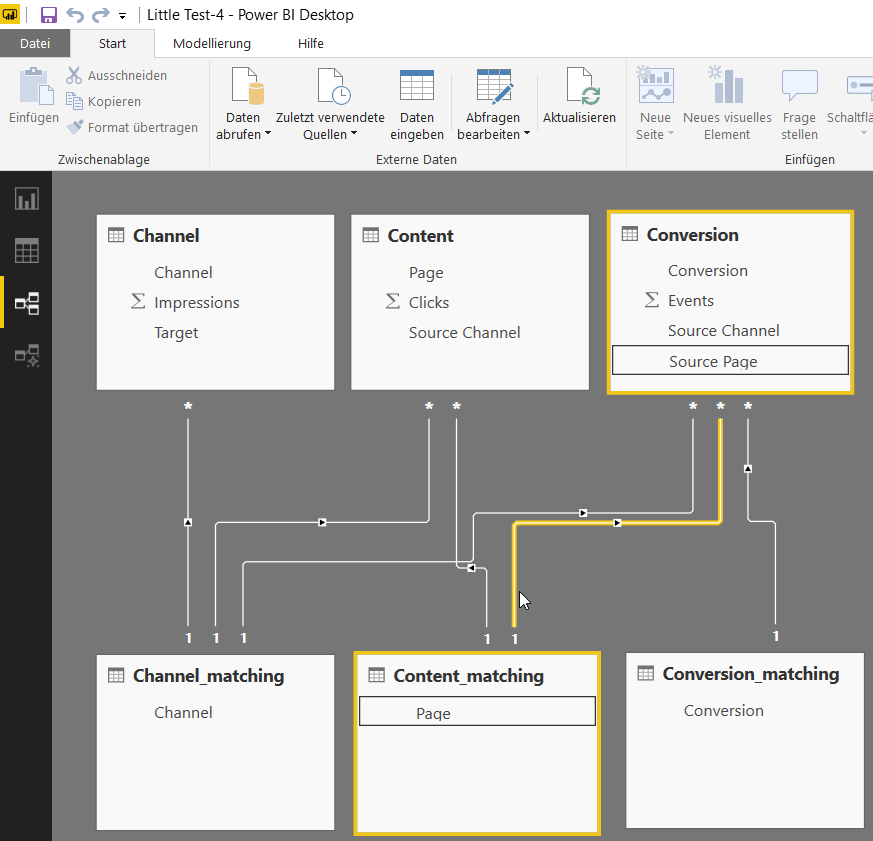
My first approach to solve that was to use the 4th table as some kind of a matching table. This however only worked for (1) but not for the reverse filter setting (2).
Does anyone have a clou?
A sample PBI file can be found here: Sample File
A Channel Table
| Channel | Impressions | Target |
| Google_1 | 1000 | Produkt |
| Google_2 | 50 | Start |
| Xing_1 | 2000 | Produkt |
| Xing_2 | 250 | Start |
A Content Table
| Page | Clicks | Source Channel |
| Produkt | 100 | Google_1 |
| Start | 5 | Google_2 |
| Produkt | 200 | Xing_1 |
| Start | 2 | Xing_2 |
A Conversion Table
| Conversion | Events | Source Channel | Source Page |
| Download | 5 | Google_1 | Produkt |
| Download | 1 | Google_2 | Start |
| Download | 10 | Xing_1 | Produkt |
| Download | 1 | Xing_2 | Start |
| Contact | 5 | Google_1 | Produkt |
| Contact | 0 | Google_2 | Start |
| Contact | 10 | Xing_1 | Produkt |
| Contact | 0 | Xing_2 | Start |
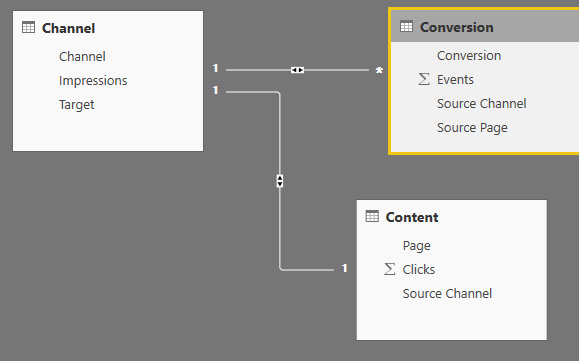
You should be able to keep just the three source tables, and then make a relation from the channel table to the other two tables. And that is more or less it, if this solves the problem mark it as solved.
Thanks for your help. Unfortunately it doesnt resolve the isse.
1. There is a warning due to the many to many relationship which I would like to avoid.
2. When I filter by Channel (e.g. Google_1) the associated clicks and events dont get filtered automatically and vice versa.
I was thinking of including matching tables but this doesnt work right as well. It does however show me the right values when I start from the channel table. The further I go, the more inconclusive the values gonne get. The Content table only shows two columns correct. The Conversion table only shows conversions correct.
Share feedback directly with Fabric product managers, participate in targeted research studies and influence the Fabric roadmap.
Check out the February 2026 Power BI update to learn about new features.
| User | Count |
|---|---|
| 51 | |
| 40 | |
| 37 | |
| 14 | |
| 14 |
| User | Count |
|---|---|
| 84 | |
| 71 | |
| 38 | |
| 29 | |
| 27 |