Don't miss your chance to take the Fabric Data Engineer (DP-600) exam for FREE! Find out how by attending the DP-600 session on April 23rd (pacific time), live or on-demand.
Learn moreNext up in the FabCon + SQLCon recap series: The roadmap for Microsoft SQL and Maximizing Developer experiences in Fabric. All sessions are available on-demand after the live show. Register now
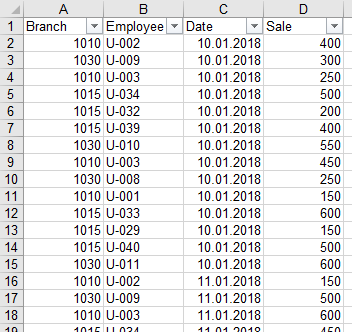
This is my Table in Power BI Desktop and the according Data Sheet:
How can I show the Name-Code of the Employee in the Power BI Table, next to the Quick Measure with his Sales?
Solved! Go to Solution.
Hi, Please try with this measure:
EmployeeCode =
VAR SALEMAX = [Sale max per Employee]
VAR TABLEEMPLOYEE =
SUMMARIZE (
Table1;
Table1[Employee];
"SALES"; CALCULATE ( SUM ( Table1[Sale] ) )
)
RETURN
CALCULATE (
VALUES ( Table1[Employee] );
FILTER ( TABLEEMPLOYEE; [SALES] = SALEMAX )
)Regards
Victor
Lima - Peru
Hi, Please try with this measure:
EmployeeCode =
VAR SALEMAX = [Sale max per Employee]
VAR TABLEEMPLOYEE =
SUMMARIZE (
Table1;
Table1[Employee];
"SALES"; CALCULATE ( SUM ( Table1[Sale] ) )
)
RETURN
CALCULATE (
VALUES ( Table1[Employee] );
FILTER ( TABLEEMPLOYEE; [SALES] = SALEMAX )
)Regards
Victor
Lima - Peru
I don't understand exactly, how your solution works, but it does work perfectly, thx for that!
Hi, The measure work in this way:
First i declare two variables :
1. With the MaxSale (Your measure)
2 A variable to store a "temporal table" with the summarize of employees and his sales.
After that create a 1 column table (in this case with Values) of the employee where the sales are equal to MaxSale
The issue is when 2 employees had the MaxSale. In this case you should evaluate what desire to show. Only One Employee or Both.
Regards
Victor
Lima - Peru
@VvelardeThank you for the explanation.
Unfortunately I just figured out, that this solution doesn't work, when I use the date-slicer. Do you have an idea?
anybody?
If you have recently started exploring Fabric, we'd love to hear how it's going. Your feedback can help with product improvements.
A new Power BI DataViz World Championship is coming this June! Don't miss out on submitting your entry.
| User | Count |
|---|---|
| 46 | |
| 43 | |
| 39 | |
| 20 | |
| 15 |
| User | Count |
|---|---|
| 68 | |
| 68 | |
| 31 | |
| 27 | |
| 24 |